Behavior-based email

Agentic Analytics& Lifecycle Emailfor SaaS

Analyze every user with Behavly Agent, create intelligent follow‑up paths, and send personalized emails in your voice and brand design. Built for B2B and B2C teams.

Get started

Now playingHeatmaps

Clicks, rage clicks, movement and scroll

  • Freeplan to start
  • Nocredit card
  • Your ownmailbox or email service
  • Gmail
  • Resend
  • Supabase
  • Claude
  • Clerk

How it works

See what every user does.Follow up, with AI.

One product for behavior, campaigns and replies: a snippet on your site, each email written for one person, sent from your own mailbox.

Agentic Analytics

See what every user does

Heatmaps of every click and scroll, site activity with goals and funnels, and the groups Behavly finds in your users. Ask Behavly Agent, and it answers from your workspace.

Explore Agentic Analytics ↓

Lifecycle Email

Follow up on what they did

Describe a campaign in a sentence. Behavly lays out the emails, designs them in your brand and writes each one for one person. Replies come back with their history.

Explore Lifecycle Email ↓

Agentic Analytics

Know what every user did,before you send a thing

One snippet on your site records every visit. Ask Behavly Agent what it shows, or open the heatmaps and the numbers yourself.

01Behavly Agent

Ask it to analyze your users, find a pattern or report on results, then build a campaign or draft a reply. Nothing changes until you confirm it.

  • Analyzes what your users do, finds patterns and reports results
  • Builds follow-up campaigns and drafts replies
  • Answers from your workspace as it is now
  • The same actions in Claude, ChatGPT and other AI apps
Try Behavly Agent free →
02Heatmaps

Add the snippet once. Clicks, rage clicks, movement and scroll are painted on your real site, for everyone or one person.

  • One snippet, no identify call
  • One row per person, across their devices
  • Clicks, rage clicks, movement and scroll on your live page
  • Each person’s own heatmap, one click away
Try Heatmaps free →
03Site activity

Visitors and visits against the period before, where people came from and the pages they saw. Goals count what matters, and funnels follow visitors to it step by step.

  • Six stats, each against the period before
  • Sources, channels and campaign tags
  • Pages, countries, browsers and devices
  • Goals and funnels, from events it records itself
Try Site activity free →

In practice

Results you can see,without building a report

Monthly resultsAgentChartAsk in your own words

Ask how last month went, and get the answer as a chart.

Behavly Agent reads your Insights as they are now and draws the numbers: who came back after your emails, and which campaigns did best.

Ask Behavly Agent

Lifecycle Email

Then follow up each person,from what they did

Behavly builds the campaign, designs the emails in your brand and writes each one for one person. Nothing sends until you start it.

01Campaigns

Say who it is for and what to send, and Behavly sets up the emails and the days between them. Or add each step yourself.

  • Say who it is for and what to send, and Behavly sets it up
  • A different next email for people who opened, clicked or came back
  • Preview the exact email before anything sends
  • Waits until they open, click, visit a page or log in
  • Only what a person did counts, never a mail scanner
  • Every email knows the ones before it
Try Campaigns free →
02Brand emails

Behavly designs whole emails and templates from your brand: your logo, your colors, your images. Every block stays editable.

  • Generate from Brand designs a whole email
  • Your logo, links, images and design guide, from Brand
  • Send it as designed, or let Behavly edit the words per person
  • Template emails are unlimited on every plan
Try Brand emails free →
03Patterns & Triggers

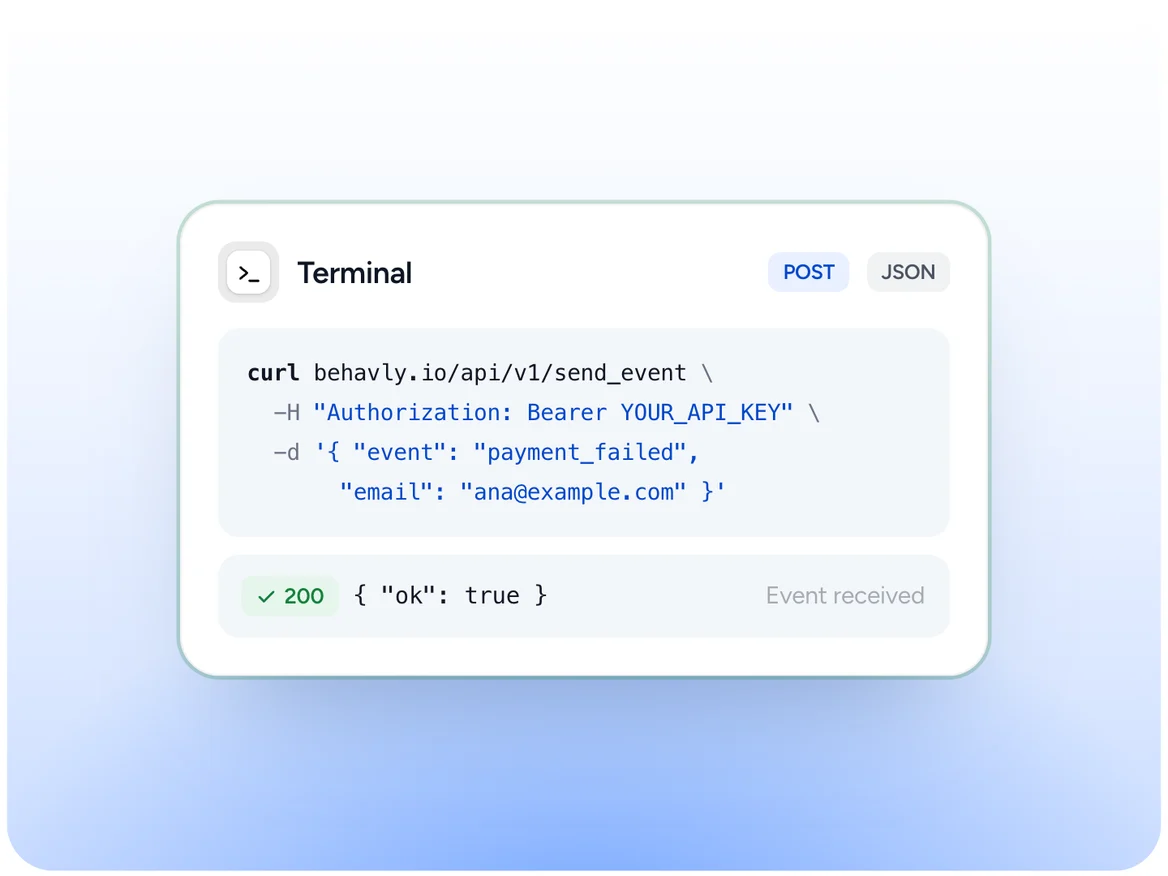
Behavly spots the groups in what people do on your site, like visited pricing then went quiet, and a Pattern Campaign follows them up. Your product sends Behavly an event, like a failed payment, and a Trigger Campaign takes that person in the moment it arrives.

  • Behavly finds the groups: went quiet, hit friction, never got going
  • Or describe a group in a sentence and see who matches first
  • Name the moment, like Payment failed
  • The person enters every live Trigger Campaign at once
Try Patterns & Triggers free →
04Replies

Every reply arrives with the sender’s site activity beside it. Answer it yourself, or let Behavly draft one for you to edit.

  • Your own mailbox, connected once
  • Each reply with what they did on your site
  • Reply with Behavly drafts it; nothing sends until you do
  • History: every email and path step with that person
Try Replies free →

Three ways to start

Intelligent follow-up paths,from sign-up to billing

Trial onboardingGroupAlways onStarts when someone joins

Welcome every new user, then wait for what each one does.

Everyone who joins the group later starts the path too. The next email holds until they open, click, visit a page or use your product.

Build this follow-up
Pricing, then quietPatternOnceStarts from what people do

Follow up the people who looked at pricing and went quiet.

Behavly spots the groups in your own users. Or describe one in a sentence and see who matches before anything sends.

Build this follow-up
Failed paymentTriggerAPIStarts from your product

A declined card starts the follow-up the moment it happens.

Your backend sends Behavly an event, and every Trigger Campaign that starts on it takes that person in as it arrives.

Build this follow-up

Connect any AI app over MCP

Paste one URL into Claude, ChatGPT, Gemini, Cursor or any app that supports MCP, and work in your workspace with the same actions as the Behavly Agent.

Read the MCP docs →

Easy to set up

Three steps to your first follow-up

Add one snippet to your site, connect your mailbox and describe the campaign in words. The app walks you through the rest.

Already built

Everything to understand and follow up,ready when you are

Patterns01
Patterns Behavly finds for you

Behavly spots the groups in your own users: visited pricing then went quiet, hit friction on a page, never got going. Or describe one in a sentence and see who matches before anything sends.

Get started →
Live02
See who is on your site right now

Site activity shows how many people were active on your site in the last five minutes, beside the numbers for the range you pick.

Get started →
Explore03
Follow the paths people take

Pick a starting page and see where people went next, then the step after that.

Get started →
Always on04
A path that keeps running for everyone who joins

Set a campaign to Always on and everyone who joins the group later starts the path too. It runs until you pause or stop it.

Get started →
A/B test05
Test two versions of any email

Try a second version of a step on half the people who reach it. Each person always gets the same one, and Behavly names a winner once the results are clear.

Get started →
Test send06
Send the whole path to yourself first

Every email on the path, written for one real person, arrives in your own inbox marked [Test]. Waits are skipped, and only you receive anything.

Get started →
Control07
Read every email Behavly writes before it goes out

Turn on Review and each email Behavly writes waits for you, then sends when you release it. Nothing goes out until you activate the campaign.

Get started →
Design08
Emails designed from your brand

Behavly designs whole emails and templates from your brand: your logo, your colors, your images. Every block stays editable.

Get started →
Languages09
Every email in the reader’s language

Behavly can detect each person’s language and write their email in it, or you set the language of an email yourself. It writes in 23.

Get started →
Leads10
Form leads, followed up on their own

People who leave their email in a form on your site are kept apart from signed-in users, as Form leads, so a campaign can give them a path of their own.

Get started →
Insights11
See who came back, and how fast

Follow how people re-engage after your emails and how long it takes, and see which campaigns did best.

Get started →

Why behavior email

Emails sent on what people do perform better.

Automated, personal emails beat scheduled campaigns on opens, conversions and revenue. That is the email Behavly sends.

  • 24%higher open rates for automated emails than scheduled campaigns
  • 19×higher conversion rate for automated emails
  • 30%of email revenue comes from automated emails, just 2% of sends
  • 76%of people get frustrated when messages aren’t personal

One setup, your own tools

Works with the tools you already use.

Behavly sends from your own mailbox or email service, recognizes the people signed in through your login provider, and works inside your AI apps.

  • 23languages Behavly writes in
  • 52Help Center articles on how each part behaves
  • 15mailboxes, email services, sign-in providers and AI apps it works with
Get started

Free to start, no credit card

Pricing

Start free,move up when you need more

Every plan sends through your own mailbox or email service. Start on the Free plan with no credit card, and move up when you need more.

  • Free

    Try it on one site.

    $0/ month

    No credit card required

    Start for free
    • 1 connected mailbox
    • 1 tracked website
    • 100 tracked contacts
    • 50 personalized emails per monthEvery email Behavly writes or personalizes for one person, and every AI reply draft in your inbox. Emails sent exactly as you designed them are not counted.
    • Unlimited template emailsTemplates sent as designed, exactly as you built them, with merge tags like the first name filled in. They use none of your personalized emails and have no monthly limit.
    • 3 AI email designs per monthGenerate from Brand in the template editor: Behavly designs a complete email from your brand — layout, icons, illustration and copy. Plain-text templates and designs you build yourself are not counted.
    • 1 seat
    • 30-day data retentionHow long behavior data — page views, clicks and sessions — is kept before Behavly deletes it. Campaigns and contacts are not affected.
    • Patterns Behavly findsBehavly watches what people do in your product, finds the behavior worth acting on, and writes each person a follow-up about it.
    • Unlimited Pattern and Trigger CampaignsA Pattern Campaign sends a path to a group, such as all users or a pattern Behavly found, once or always on for everyone who joins. A Trigger Campaign starts the moment your product sends an event. Run as many as you like on every plan.
    • Inbox with reply classificationReplies land in Behavly's inbox sorted by what they are — interested, not now, out of office, unsubscribe — so you answer the ones that matter. Add your own lead statuses and open the files people send you.
    • HeatmapsSee where people click, how far they scroll, and where they get stuck on each page.
    • Email support
  • Starter

    For one product, one team.

    $79/ month

    Billed monthly

    Choose Starter

    Everything in Free, plus

    • 2,500 tracked contacts
    • 2,000 personalized emails per monthEvery email Behavly writes or personalizes for one person, and every AI reply draft in your inbox. Emails sent exactly as you designed them are not counted.
    • 25 AI email designs per monthGenerate from Brand in the template editor: Behavly designs a complete email from your brand — layout, icons, illustration and copy. Plain-text templates and designs you build yourself are not counted.
    • 3 seats
    • 90-day data retentionHow long behavior data — page views, clicks and sessions — is kept before Behavly deletes it. Campaigns and contacts are not affected.
    • Anonymous visitorsSee activity on your site before a visitor is identified.
  • Growth

    For teams that follow up daily.

    $249/ month

    Billed monthly

    Choose Growth

    Everything in Starter, plus

    • 3 mailboxes with rotationSpread a campaign's emails across several mailboxes. Daily limits and the wait between sends work per mailbox on every plan.
    • 3 tracked websites
    • 10,000 tracked contacts
    • 8,000 personalized emails per monthEvery email Behavly writes or personalizes for one person, and every AI reply draft in your inbox. Emails sent exactly as you designed them are not counted.
    • 75 AI email designs per monthGenerate from Brand in the template editor: Behavly designs a complete email from your brand — layout, icons, illustration and copy. Plain-text templates and designs you build yourself are not counted.
    • 10 seats with rolesChoose what each teammate can do.
    • 180-day data retentionHow long behavior data — page views, clicks and sessions — is kept before Behavly deletes it. Campaigns and contacts are not affected.
    • Priority support
  • Scale

    For large user bases.

    $699/ month

    Custom limits on request

    Contact us

    Everything in Growth, plus

    • 10 connected mailboxes
    • Unlimited tracked websites
    • 40,000 tracked contacts
    • 30,000 personalized emails per monthEvery email Behavly writes or personalizes for one person, and every AI reply draft in your inbox. Emails sent exactly as you designed them are not counted.
    • 250 AI email designs per monthGenerate from Brand in the template editor: Behavly designs a complete email from your brand — layout, icons, illustration and copy. Plain-text templates and designs you build yourself are not counted.
    • Unlimited seats
    • 1-year data retentionHow long behavior data — page views, clicks and sessions — is kept before Behavly deletes it. Campaigns and contacts are not affected.
    • Compliance exportsExport the AI access log and the record of processing.
    • Onboarding and custom limits

Prices in USD, excluding VAT. Your first workspace is free; each additional workspace carries its own plan.

Still got questions?

Read the FAQs

Can’t find your answer?

The Help Center has 52 articles on how each part of Behavly behaves.

Open the Help Center

Or email us → hello@behavly.io

What is Behavly?

Behavly is behavior-based email for SaaS and other products people sign in to. A snippet records what each signed-in user does on your site. You describe a follow-up in plain words, Behavly lays out the path of emails, waits and branches, and Behavly Agent writes each email from that person’s own activity, sent from your own mailbox or email service. Replies come back to a shared Inbox with each sender’s activity on your site alongside. It is not a cold-outreach tool: everyone in your workspace signed in on your site, filled in one of your forms, or was imported by you.

How do I get started?

Three steps. Add the tracking snippet to your site, which is where all behavior data comes from. Connect a mailbox, which sends your campaigns and feeds the Inbox. Then create your first campaign: pick a group or a trigger, and describe the path in words or build it step by step. Nothing sends until you activate it.

What does Behavly track on my site?

The snippet records each visit: the pages people see, where they came from, and their clicks, rage clicks, movement and scroll for heatmaps. Goals like form submits, outbound link clicks and file downloads count on their own, and funnels follow visitors through your goals in order. Behavly Agent answers questions from the same workspace.

How does Behavly know who a visitor is?

The snippet detects a signed-in session on your site by itself. There is no identify call to add. Each identified user is listed once, as a person: visits from a laptop and a phone are merged under the same email. Visitors who are not signed in appear separately as anonymous sessions.

What is Behavly Agent?

The AI built into Behavly. Ask in your own words and it does the work in your workspace: it builds a campaign, finds a pattern, drafts a reply or reports how a campaign is doing. In a campaign it writes each email for one person from what they did. Nothing changes until you confirm, and nothing sends until you activate it.

Do I review emails before they send?

Yes. Turn on Review in a campaign and every email Behavly writes waits for you, then sends when you release it. Before you activate, Preview writes any email for a real person without sending it. In the Inbox, Behavly writes the draft and you send it.

Which email accounts can I connect?

Any mailbox that supports IMAP and SMTP: Gmail or iCloud with an app password, Titan, Zoho, Fastmail, your own domain’s mail host. Or an email service, connected with its API key: Resend, Amazon SES, Postmark, SendGrid, Mailgun, Brevo, Mailchimp Transactional or MailerSend, plus that address’s inbox over IMAP so replies come back. You can connect several, and replies to a connected mailbox land in the Behavly Inbox with each sender’s activity on your site alongside.

How is my customers’ data handled, and can I limit what reaches AI?

You stay in control. AI can be turned off for your whole workspace, and when it is on you decide how customer data is treated before it is used and how long behavior data is kept. Visitor IP addresses are never stored. Every account, campaign and workspace action is recorded in an audit log you can export.

You’ve reached the end, so now…

Meet the Behavly Agent.

It reads what each user does in your product and writes their follow-ups. Free to start, no credit card.

Get started