 Behavly
Agentic analytics vs traditional analytics: from dashboards to answers
Traditional analytics gives you dashboards to read. Agentic analytics gives you an agent that reads them for you, names the people behind the numbers and prepares the next step. Here is what changes, what stays, and how to tell a real analytics agent from a chat box.
Traditional analytics is a set of dashboards and reports that someone built and someone else reads. Agentic analytics puts an AI agent between the question and the data: you ask in plain words, it reads what it needs, answers, names the people behind the answer and gets the next step ready for you to confirm.
It is not a replacement for the dashboard. It is a different way in, and for a SaaS team it changes who can answer a question and how quickly an answer turns into something done. If the term is new to you, start with What is agentic analytics?
The short answer, side by side
| Traditional analytics | Agentic analytics | |
|---|---|---|
Where you start | A dashboard someone built | A question in your own words |
Who finds the number | You, by picking the report and the filters | The agent, by choosing what to read |
Who it happened to | Usually a rate; the people need an export | The people, by name, or a pattern that keeps finding them |
How fresh it is | As fresh as the report | Read at the moment you ask |
What happens next | You copy the list into another tool and act there | The agent prepares the step; you confirm it |
What you need to know | Which report, which filter, sometimes SQL | What you want to know |
What dashboards still do best
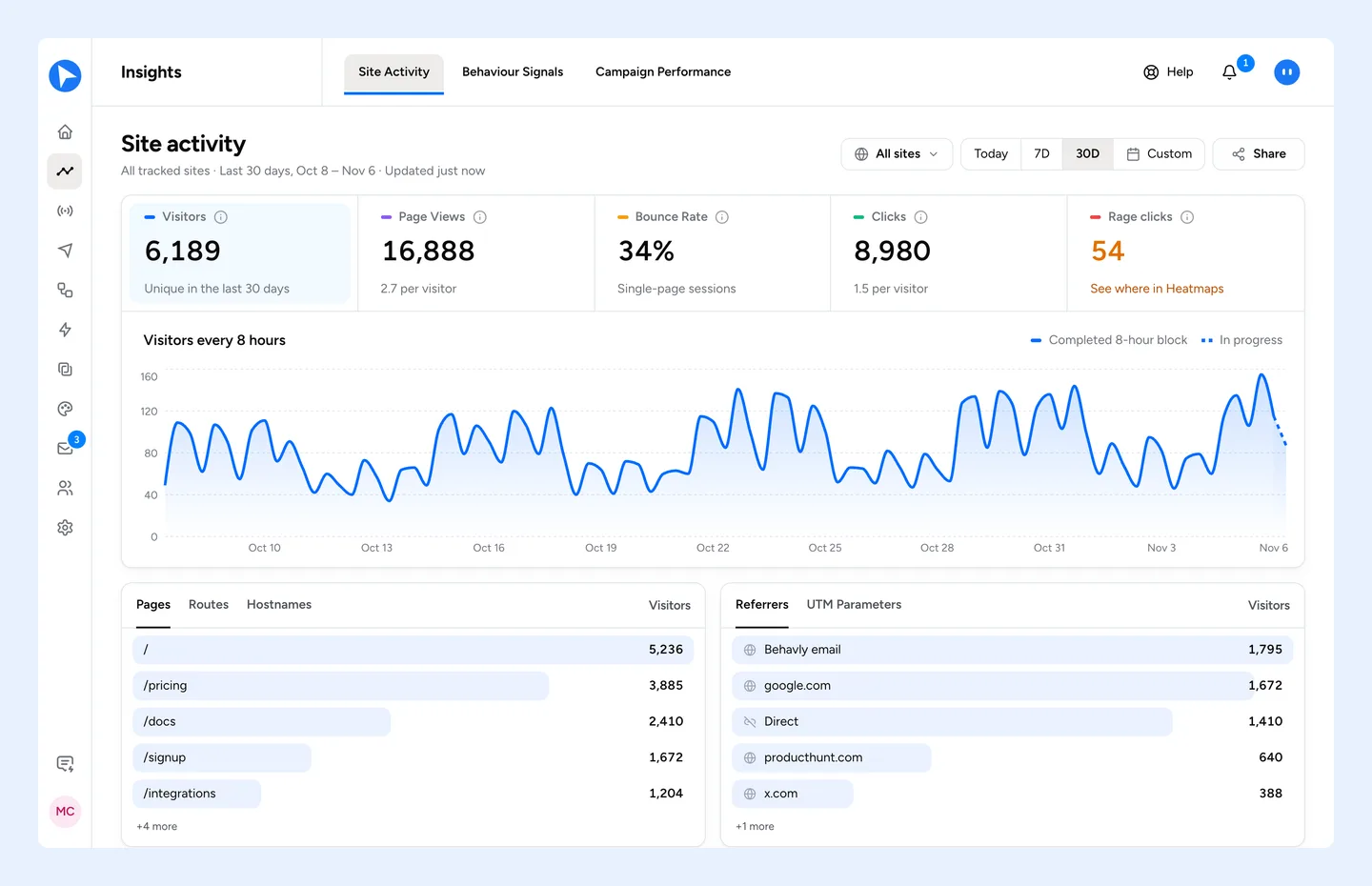
A dashboard is the right tool for watching. The same numbers, in the same place, every morning, so a change stands out. Behavly keeps that: Insights → Site activity shows unique visitors, visits, page views, views per visit, bounce rate and visit duration, each against the period before, with where people came from, the pages they saw, goals and funnels. Heatmaps paints clicks, rage clicks, movement and scroll over your live pages.
Where a dashboard runs out is the question it was not built for, and the step after the answer. That is where an agent earns its place.
What changes with an agent
Questions instead of reports
“Which pages do people interact with most?” has an answer in the data, but no report called that. An agent decides which reads answer it, here the pages ranked by heatmap activity, and does them in the right order.
People instead of percentages
A dashboard tells you what share of last week’s signups never came back. An agent can tell you who they are. In Behavly, signed-in users are one row per person across their devices, so “who visited pricing this week” is a list of people you can follow up with, not a share of sessions.
The next step in the same place
With traditional analytics, the answer is where the work starts: export the list, rebuild the segment in an email tool, write one email for everyone. Behavly Agent can turn the people it found into a pattern and build the follow-up campaign from it, in the same chat, after you confirm.
A worked example: “Why did signups drop this week?”
The traditional way
- 1Open the dashboard and compare this week to last week.
- 2Find the funnel report and work out which step lost people.
- 3Open the heatmap for that page and look for the problem.
- 4Export the people who stalled, if the tool can name them at all.
- 5Import them into the email tool, write one email and send it to everyone.
The agentic way, in Behavly
- 1Ask Behavly Agent where signups dropped this week. It reads the signup funnel (visitors, engaged, saw signup, started the form, submitted, newly identified), where people dropped off and which form fields failed.
- 2Ask what frustrated people on the signup page. It reads that page’s heatmap: where people rage-clicked and which clicks did nothing.
- 3Ask for the people who signed up but never came back. It finds them as a pattern, with its rules in plain words and the exact count, before anything is saved.
- 4Ask for a campaign for them. It builds the path as a draft, and each email in it is written for one person from what that person did. Nothing sends until you activate it.
Visitors who left the form before signing up stay anonymous, so the fix for them is the page. The people who signed in are the ones you can write to, and that is where the agent hands over to lifecycle email.
How to tell a real analytics agent from a chat box
Many tools now have a chat box. Use these questions to tell which ones are agents:
- Does it read your live data, or describe a report you already have? Behavly Agent looks things up at the moment a question needs them.
- Can it name the people, or only the rate? Behavly answers with the people behind a number, one row per person.
- Can it act, and does it ask first? Behavly Agent shows a confirmation card with exactly what will happen and runs only when you choose Confirm.
- Is there a record? Every change it makes is in Audit Logs, marked via Behavly Agent.
- Does it respect roles and privacy? It acts with your role’s access, and Pseudonymize or Strict decides what reaches the model.
- Can you use it where you already work? Behavly’s reads and actions are also available in Claude, ChatGPT and other AI apps over MCP.
Use both
The best setup keeps the dashboard for watching and adds an agent for asking and acting. In Behavly they read the same data from the same snippet, so the number you see in Insights is the number Behavly Agent gives you, and the people it names are the people a campaign will write to.