 Behavly
AI user onboarding: how to use AI to onboard and activate SaaS users
Where AI speeds up SaaS onboarding: finding where new users stall, helping in the app, and writing each one an email about their own unfinished step.
AI user onboarding means using AI to get each new user to the moment your product becomes useful to them, faster than a fixed tour or a day-1, day-3, day-7 email sequence can. It helps in three places: finding where new users stall, guiding the ones who are in your product right now, and following up with each person about the exact step they stopped at. The last one usually matters most, because the new users who stall rarely come back to see the help waiting for them in the app.
- Find where they stall: AI reads what new users did and tells you which step loses them, in words, without building a report.
- Guide them in the app: an AI onboarding assistant answers questions and starts walkthroughs for the people who are logged in.
- Follow up with each person: an AI onboarding agent writes every new user an email from what they did, so the person stuck on an import hears about the import.
What AI can do in onboarding
Most “AI onboarding” software does one of these jobs, so start with the job you need done rather than the label on the tool.
| Job | What the AI does | Who it reaches | Tools that do it |
|---|---|---|---|
Find where new users stall | Reads each new user’s activity and names the group that never reached your activation step | Your team | Behavly (Behavly Agent and patterns); product analytics suites |
Choose who gets which message | Builds an audience from a plain-language description, such as “signed up last week, never imported data” | Your team | Behavly |
Write each new user’s follow-up | Writes the email at send time, for one person, from their own activity | Every new user, in their inbox, including people who never came back | Behavly |
Answer questions in the app | Answers from your help content and sometimes starts a walkthrough | Users who are logged in and ask | Intercom Fin, Userflow, UserGuiding, Product Fruits, Frigade |
Draft tours and checklists | Builds a draft in-app experience from your brief, for your team to publish | Users who are logged in | Userpilot, Appcues, Pendo, Chameleon |
Our round-up of the best AI onboarding agents and tools for SaaS compares all ten of these tools on price, platforms and what their AI does, with every fact linked to the vendor’s own page.
How to use AI for faster user onboarding, step by step
- 1Define activation as one event. Pick the action after which your product is useful to someone: a first report on real data, a first teammate invited, a first invoice sent. AI can only push people toward a finish line it can see.
- 2Record what each new user does. The AI is only as good as the activity it reads. Track signed-in users as people, not browsers, so a signup on a laptop and a return visit on a phone count as one person.
- 3Ask where they stall. Instead of building a funnel by hand, ask in plain words: which new users never reached the activation event, and what did they do last? The answer is a group, with the people in it.
- 4Split new users by what they did, not by signup date. Someone whose import failed and someone who never opened the import screen need different emails, even if they signed up the same day.
- 5Let the AI write each follow-up from that person’s activity. The email names the step they stopped at and the one thing that gets them past it. Two people at the same step get two different emails.
- 6Stop the moment they activate, and count activations, not opens. Anyone who reaches the activation event leaves the path. The number that matters is how many people in the group activated after an email.
AI onboarding assistant, chatbot or agent?
The names overlap, so sort tools by where the AI acts. An AI onboarding assistant or onboarding chatbot sits inside your product and answers the new users who ask. An AI onboarding agent acts on its own: it follows what each new user does and writes to them when they stop short of a step, whether or not they come back.
For SaaS activation, the two meet in the middle. The assistant helps the people who are in your product today. The agent reaches the people who signed up, hit a wall and closed the tab, and in most products that’s the larger group. If you’re choosing one first, choose the one that reaches the people you’re losing.
Example: AI onboarding emails for three new users
These are for Plotline, a made-up roadmap tool. Activation is sharing a first roadmap with the team. All three people signed up on the same day and stalled at different steps, so each gets a different email, written from what they did.
Subject: Your Plotline roadmap, from the Jira board you already have
Hi Sara,
Your Plotline workspace is ready, and the quickest way to fill it is the Jira board your team already uses. The import keeps each epic’s dates and owner, so the roadmap is drawn for you.
It takes about two minutes, and you can undo it.
Import from Jira: [link]
Milo
Subject: Your Q1 roadmap is ready to share
Hi Daniel,
Your Q1 roadmap has 14 items across three lanes, and the Payments lane is fully dated. It’s only visible to you so far.
Sharing it with your team takes one link, and they can comment without a Plotline seat.
Share your roadmap: [link]
Milo
Written from Daniel’s own activity: the roadmap he built, its lanes and what’s still private.
Subject: The Jira import, without the admin token
Hi Amira,
You opened the Jira import a few times this week, and it asks for an admin API token, which most people don’t have.
There’s a second way in: export your board as a CSV from Jira’s board menu and drop it into Plotline. Same dates, same owners, no token.
Import a CSV instead: [link]
Milo
Feature adoption without emailing the whole user base
Onboarding doesn’t end at signup. When you ship a feature, the usual move is an announcement to everyone, which tells the people already using it something they know and buries it for the rest. AI lets you aim instead: pick the group whose activity shows the feature would help them, such as people who export the same report by hand every week, and leave everyone else alone.
- Choose the group by behavior. “Exported a CSV three times this month and never opened Scheduled reports” is a group of people with a reason to care.
- Skip the people who already did it. If someone tries the feature before their email goes out, the email shouldn’t send.
- Write from their own use. “You exported the pipeline report four times this month” beats “Check out our new feature”.
Our guide to feature adoption emails has more examples and timing.
What to measure
- Activation rate of the group. Of the new users who stalled at a step, how many reached the activation event after the follow-up.
- Time to activate. How many days from signup to the activation event, and whether the follow-ups shorten it.
- Which email came last. The email each person got just before they activated tells you which message is doing the work.
- Not opens. Mail apps that load images on their own, Apple Mail among them, count opens nobody made. Activation is the number that can’t be inflated.
Mistakes to avoid
- Using AI to write the same email faster. A generic welcome written by AI is still a generic welcome. The value is in writing from each person’s activity.
- An assistant as the only plan. It answers the users who come back and ask. The ones who didn’t come back never meet it.
- No finish line. Without one activation event, the AI can’t tell who is done, and people keep getting “finish your setup” after they finished.
- Emailing forever. Two to four emails about the stalled step over the first two weeks, then stop until something changes for them.
- Fixing the product with email. If everyone stalls on the same screen, look at that screen first. A heatmap of where new users clicked and stopped scrolling will often show why.
How to run AI user onboarding in Behavly
Behavly is our product. It does the finding and the following up: it records what each signed-in user does, finds the groups who stalled, and writes each onboarding email from that person’s own activity, sent from your own mailbox.
- 1Install the tracking snippet from Tracking → Setup, including on your signed-in pages. Behavly recognizes who is signed in with no identify call, and joins each person’s activity across the browsers they use. Send your activation event with
behavly.track, sayroadmap_shared. - 2Ask where new users stall. Behavly Agent, the chat built into Behavly, finds a pattern from a question in your own words, such as new users who never shared a roadmap. Heatmaps show where they clicked, rage-clicked and stopped scrolling on your setup screens, for everyone or for one person.
- 3Pick who enters. In Automations, choose Pattern Campaign, then Choose who enters: a pattern Behavly found, or one you describe in words under Looking for another pattern?.
- 4Describe the path. Write it in a sentence, such as “welcome them, wait two days, and if they haven’t imported anything, help with the import”, and Behavly lays it out as emails, waits and branches.
- 5Keep it running. Set How it runs to Always on. Behavly re-checks the group every 10 minutes and each new user enters once, soon after they join it. Turn on Also the people in it now to include the people who stalled already.
- 6Set the finish line. Under Goal, choose your activation event and turn on Take them off the path when they reach it. Behavly counts who reaches it and after which email.
- 7Read before it sends. Preview writes any step for a real person in the group. With Approval on, you approve each email Behavly writes before it goes out.
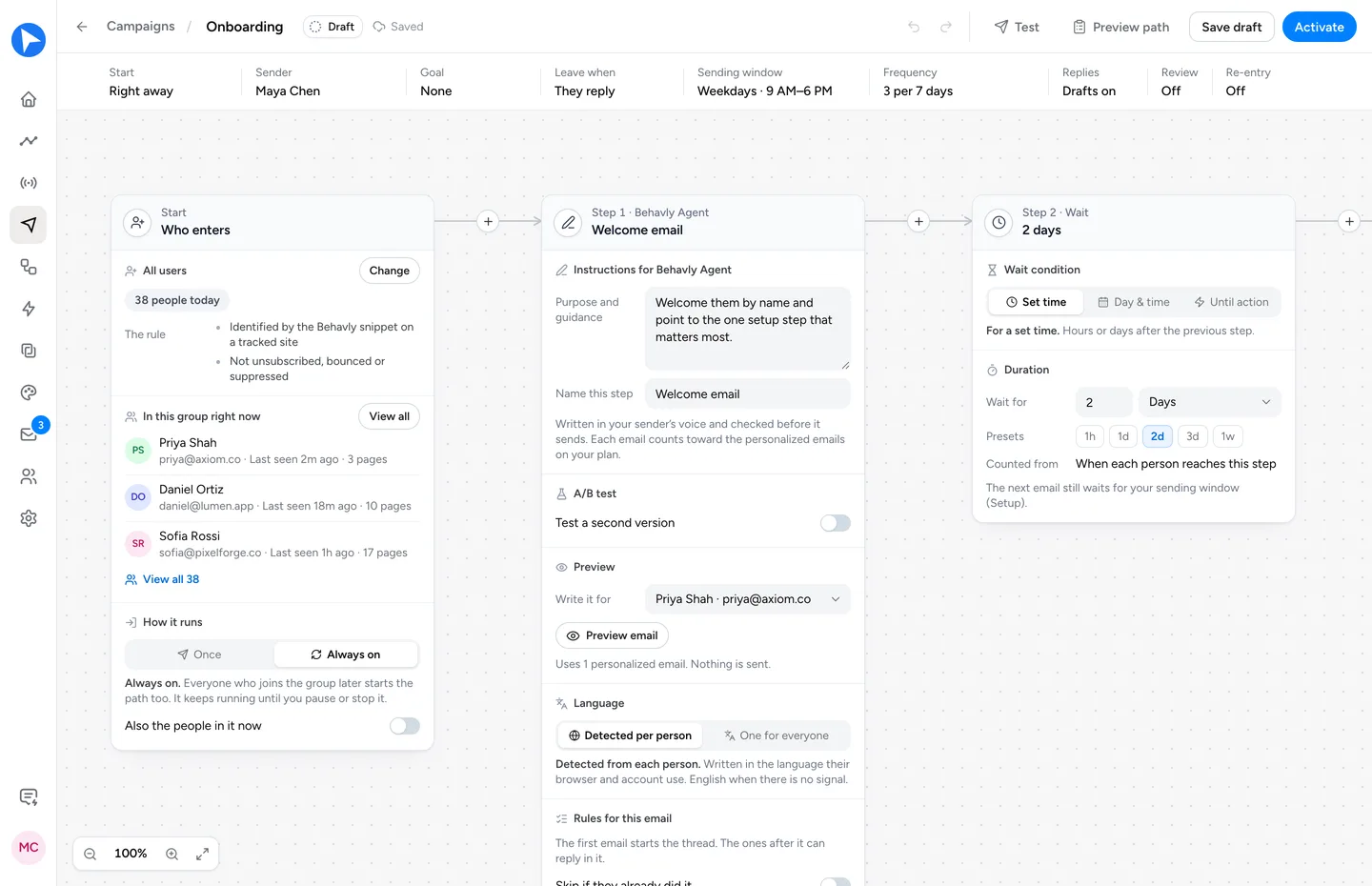
Each email can be written in the reader’s own language, from 23, and always-on campaigns run on every plan, Free included.
Questions
- How can AI help with user onboarding?
- In three ways: it finds where new users stall by reading their activity, it answers questions inside your product through an AI onboarding assistant, and it writes each new user a follow-up about the step they stopped at through an AI onboarding agent such as Behavly. The follow-up reaches people who never came back, which in-app help can’t.
- What is AI user onboarding?
- Using AI to get each new user to activation, the first moment your product is useful to them. Instead of the same tour and the same email sequence for everyone, the AI works from what each person did: which step they reached, where they got stuck, and what they need next.
- Can AI onboard users automatically?
- It can run the follow-up on its own once you set the rules. In Behavly, an always-on path takes in each new user who matches the group, writes every email from that person’s activity, and takes them off the path when they reach your activation event. With Approval on, you approve each email before it goes out.
- Do I need an in-app assistant and an email agent?
- They do different jobs. An in-app assistant helps the new users who are logged in and ask. An email agent reaches the ones who left before finishing setup. If you start with one, start with the one that reaches the people you’re losing, which for most SaaS products is the email.
- Is there a free AI onboarding tool?
- Yes. Behavly’s free plan has no time limit, covers 100 tracked contacts and writes 50 personalized emails a month, and always-on onboarding paths are included. Our AI onboarding tools round-up lists which other tools have a free plan.