
Users who signed up but never activated: how to follow up
Why SaaS signups stall before activation, which behavior shows the reason, and the follow-up emails that help each person finish setup. With examples.
Updated October 10, 2026
Users who never activated are people who signed up for your product but never completed the action that makes it useful to them, such as creating a first project, connecting their data or inviting their team, and an activation email is one that helps a person finish that specific step. They’re worth the effort because they’ve already done the hard part of the funnel: they found you, decided you were worth trying, and gave you their email address. What stopped them is usually small and specific, and what they did inside your product before they stopped tells you what it was.
Define “activated” before you write anything
Activated has to mean one action your product can observe, not a feeling. Good activation events sit at the point where the product starts doing its job: a first report built on real data, a first customer email answered from a shared inbox, a first invoice paid. Signing up, verifying an email address and finishing a product tour don’t count, because people do all three and still leave.
If two steps seem equally important, pick the later one. Then write the definition down where the whole team can see it. A team that disagrees on what activation means ends up emailing “finish your setup” to people who already did.
Why signups don’t activate
The reason someone stalled decides what the email should say, so it’s worth naming the usual ones before looking at any data.
- They got interrupted
- They signed up between meetings, meant to come back and didn’t. A reminder with a direct link to the next step is enough.
- They hit friction
- A step was confusing or didn’t work for their setup: an import that failed, an integration that needed a setting they couldn’t find. They need help with that step, not encouragement.
- They needed someone else
- The next step needs a developer, an admin or whoever holds the budget. The email should be something they can forward.
- They didn’t see how it applies
- They clicked around, couldn’t picture it with their own data, and left. Show it working on something close to their situation.
- They were just looking
- One short visit after reading a comparison list. Some of these people never activate, and one good email is all they should get.
Which behavior shows why they stalled
| What you can see | Likely reason | What to send |
|---|---|---|
| One short session, never came back | Interrupted, or just looking | One short email with the first step linked directly |
| Came back to the same setup screen several times | Friction on that step | Specific help for that step, from a person who can answer |
| Rage clicks or dead clicks on a setup screen | Something didn’t respond the way they expected | An offer to do the step with them, and a look at that screen yourself |
| Stopped at a step that needs code or admin rights | Needed someone else | A short note written to be forwarded to that person |
| Several visits to feature pages, nothing created | Hasn’t found their use case | A working example or template close to their situation |
| Visited pricing, never set anything up | Deciding on cost before seeing value | Help reaching value first; see pricing page follow-up |
| Not seen for 30 days or more | Moved on, for now | Nothing, until something changes that matters to where they stopped |
If many people stall on the same screen, email is the wrong fix. Look at that screen: where people click, where they stop scrolling, what doesn’t respond. One change to the product can do more than any sequence.
When to follow up with inactive signups
Each week that passes makes a follow-up less likely to land, because the reason they signed up fades too. The cadence should slow down accordingly.
- Days 1–3
- Still onboarding. Your onboarding sequence handles this window, with one email per unfinished step.
- Days 3–14
- The rescue window. Two or three emails, each about the step they stalled on, a few days apart, and each one cancelled the moment they make progress.
- Weeks 3–4
- One last useful email: the working example, the template, or the offer to set it up together. Then stop.
- After that
- Write again only when there’s news for them specifically: you shipped the integration they were missing, fixed the import that failed, or launched a plan that fits them. A product change tied to the exact place they stopped is the strongest reason to write you’ll ever have.
Stop straight away for anyone who replies “not for me”, unsubscribes or bounces. And keep their account: someone who comes back in three months should find their work where they left it.
Example activation emails
These are for Copperline, a made-up shared inbox for small support teams. Activation is the first customer email answered from Copperline, and the step where people get stuck is connecting their support address.
Subject: Connect your support address to Copperline
Hi Nadia,
Your Copperline workspace for Lumen Labs is set up, and the one step left is connecting support@lumenlabs.io. Once it’s connected, new customer emails show up in Copperline and anyone on your team can pick one up.
It takes one forwarding rule and about five minutes.
Connect your support address: [link]
Alex
Subject: The exact forwarding rule for your address
Hi Chris,
You’re connecting a Google Workspace address, which means adding one forwarding rule in Gmail’s settings. That screen is easy to get lost in, so here’s a page with the rule written out for your address and a screenshot of where it goes.
Once it’s in, the next email to your support address lands in Copperline within a minute.
Open the setup page for your address: [link]
Alex
Subject: A note to forward to your IT admin
Hi Maya,
Copperline needs one setting changed in your company’s Microsoft 365 account, and that usually takes an admin. I’ve written it up as a short note you can forward: what to change, what it gives Copperline access to, and how to undo it.
When it’s done, your shared inbox moves into Copperline with every past conversation in place.
Forward the admin note: [link]
Alex
Subject: Try Copperline before connecting anything
Hi Owen,
Assignments and saved replies are the parts you explored, so here’s what they do once mail is flowing: each new email gets an owner automatically, and the answers you type every week become one click.
I set up a demo inbox with sample customer emails so you can try both before you connect a real address.
Open the demo inbox: [link]
Alex
Subject: Copperline now connects Outlook shared mailboxes
Hi Grace,
When you signed up last month, you stopped at connecting your Outlook shared mailbox, which Copperline didn’t support yet. It does now: sign in with your Microsoft account and pick the mailbox, with no forwarding rules.
Your workspace and the two teammates you invited are still there.
Connect your Outlook mailbox: [link]
Alex
The last email is the only one sent after the rescue window, and it has a real reason to exist: the thing that blocked Grace is fixed.
Mistakes to avoid with inactive signups
- One email for every reason. The person who got interrupted and the person whose import failed need different messages. Read the behavior first.
- Product newsletters to people who haven’t done step one. Updates about new features mean nothing to someone who hasn’t seen the product work yet.
- Guilt and FOMO. “We miss you” and “you’re missing out” are about you, not them. Write about their unfinished step.
- Threatening to delete the account. It reads as pressure, and it hands them a reason to leave for good.
- Emailing forever. After three or four emails without a response, more of them teach people to ignore you or to unsubscribe. Stop, and wait for a real reason to write.
- Measuring opens. The number that matters is how many people activated after the email. Opens are also inflated by mail apps that load images automatically.
- Using email to patch the product. If the same step stalls everyone, fix the step.
How to run this in Behavly
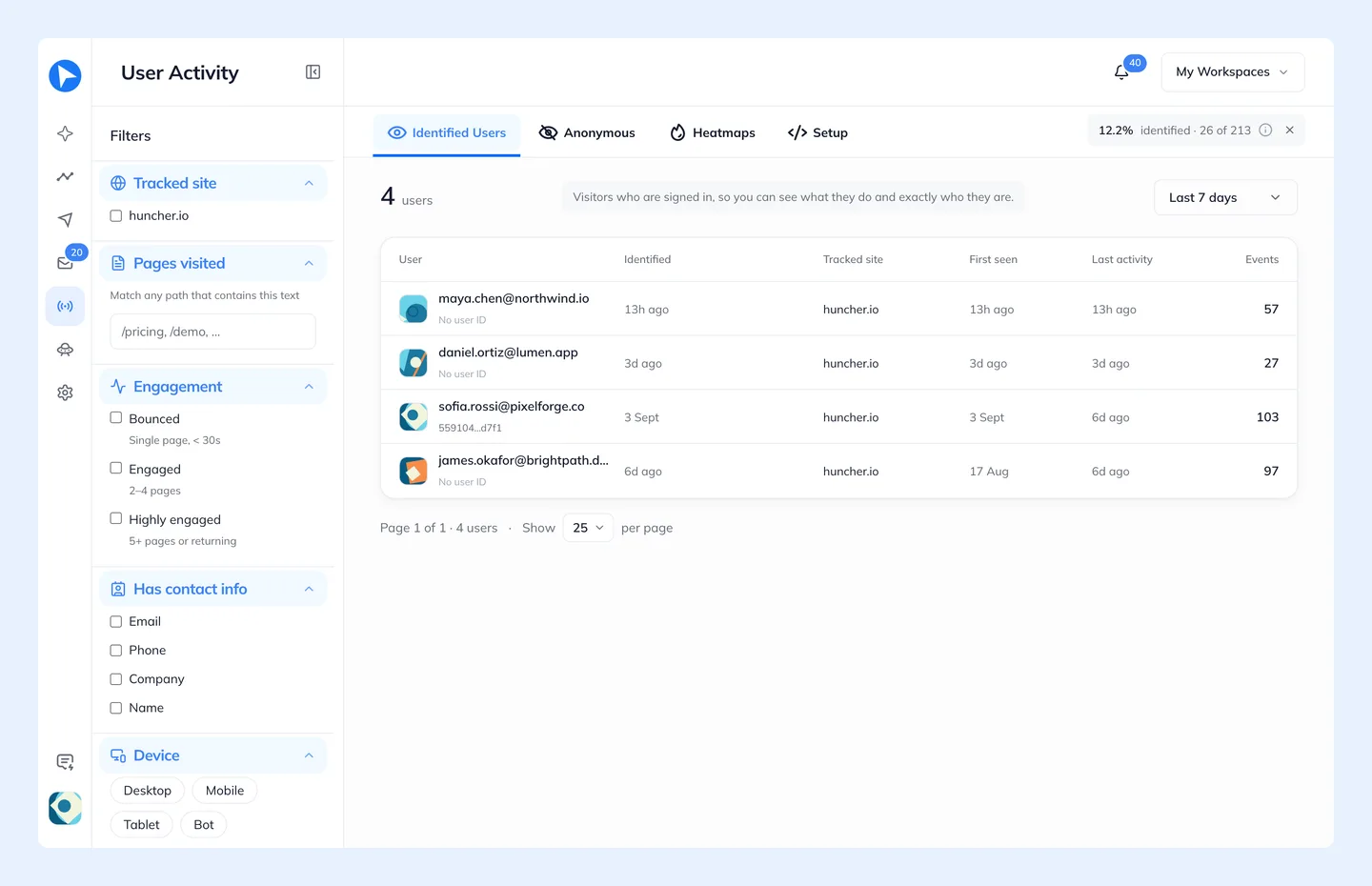
Behavly tracks what each signed-in user does in your product, finds the groups who got stuck or never did a key action, and writes each follow-up from that person’s own activity.
- 1Install the tracking snippet from User Activity → Setup, including on your signed-in pages, and send your activation event with
behavly.track(sayfirst_reply_sent). Page views, clicks and scroll depth attach to the signed-in person on their own, with no identify call. - 2See where they stall. Heatmaps shows clicks, rage clicks, dead clicks and scroll depth, and the people behind them, then opens an overlay on your own setup screens with where people clicked and how far they scrolled. Every row in User Activity → Identified Users has its own heatmap button scoped to that one person.
- 3Connect your mailbox in Settings → Email, so follow-ups come from your own address over IMAP/SMTP and replies come back to the Inbox.
- 4Start from a suggested path. In Campaigns → New Campaign, choose Behavly-Agent campaign. Under Suggested for your users, Behavly shows paths built from the largest patterns in your tracking, such as people who got stuck or never did a key action, each with how many people match today. Opening a “never did X” card also sets X as the path’s goal.
- 5Or describe the group yourself. Under Looking for another pattern?, describe it in words, such as people who visited your mailbox setup page but haven’t been back for a week, and choose Add this pattern.
- 6Bring in the backlog. Turn on Enroll people who already match, so the people who stalled before you activated the Agent enter too, not only newcomers.
- 7Shape the follow-ups. Use Wait until they do something for the activation event with a limit of a few days, Branch on logged in to your site, and turn on They reach the goal under Leave the path when, so anyone who activates stops getting these emails.
- 8Read before it sends. Preview writes each step for a real person in the group. Turn on Hold Behavly-written emails for approval and you approve the emails before they go out.
Behavly Agents start on the Starter plan. On the free plan, the same group works as a one-time campaign: choose the pattern in the Audience step, check who is in it and how many, and Behavly writes each email from what that person did before they stalled.
Questions
- What counts as an activated user?
- Someone who has completed the action after which your product is useful to them, like a first project created and shared, or data connected and a first report viewed. Pick one observable event and use the same definition everywhere.
- How long should I keep emailing users who never activated?
- Two to four emails over roughly the first two weeks, each about the step they stalled on, then stop. Write again only when something changes for them, such as shipping the integration they were missing.
- Why do users sign up and never use the product?
- The common reasons are an interruption, a step they couldn’t finish alone, a step that needed a colleague with admin rights, or not seeing how it applied to them. Their behavior usually shows which: repeated visits to one setup screen point to friction, one short visit to an interruption.
- Should I delete accounts that never activated?
- Not as a way to get a response; warning people that you will reads as a threat. Keep the account within your normal data retention policy so they can pick up where they left off.