
What is behavioral email? A practical guide for SaaS
Behavioral email is email triggered by what each person does in your product. How it works, which signals to use, when to send, examples and mistakes.
Updated October 10, 2026
Behavioral email is email sent to one person because of something they did or didn’t do in your product, such as signing up, stalling on a setup step, visiting the pricing page or going quiet for two weeks, and written about that action rather than scheduled for a whole list at once. For a SaaS product it covers most of the email that matters after signup: onboarding, activation, trial conversion, feature adoption and keeping customers from drifting away. It works because nothing in an inbox is more relevant to someone than their own unfinished work, and a well-timed email about it reads like help rather than marketing.
Behavioral email vs. drips, newsletters and transactional email
| Type | Sent because | Example |
|---|---|---|
| Newsletter or broadcast | It’s the day you planned to send | A monthly product update to everyone |
| Drip or time-based sequence | A fixed number of days has passed since signup | The same day 1, day 3 and day 7 emails to every new user |
| Transactional | The person asked for something | A password reset, a receipt, an invitation link |
| Behavioral | The person did, or didn’t do, something you care about | An email about inviting teammates, sent only to people who created a project and invited no one |
Transactional email is triggered by behavior too, but it delivers something the person requested and expects. Behavioral email is the email you decide to send. You’ll also see it called behavior-based, triggered or event-triggered email. “Event-triggered” describes the mechanism; “behavioral” describes the practice, which includes emails triggered by something not happening, like a setup step left undone for three days.
How behavioral email works
Every behavioral email program, whatever tool runs it, has the same four parts.
- Tracking
- A record of what each known person does: page views in your app, clicks, and product events such as
project_createdorinvite_sent. It has to be tied to a person, usually through their signed-in session, or there’s nobody to write to. - Entry
- The behavior that puts someone into a flow: they signed up, they hit a plan limit, they haven’t logged in for 14 days.
- Conditions and waits
- What has to be true before each email sends, such as “hasn’t connected a data source within two days” or “visited pricing twice this week”. Check conditions again right before sending, because people act in the meantime.
- Exit and goal
- What ends the flow early (a reply, the goal reached, an unsubscribe) and what success means. Without a goal you can count opens, but you can’t tell which emails changed what people did.
Which behaviors are worth an email
A behavior is worth an email when it says something about what the person needs next. These are the ones that do in most SaaS products, and each has its own guide.
| Behavior | What it suggests | Guide |
|---|---|---|
| Signed up, setup unfinished | They need the next step, not a feature tour | SaaS onboarding email sequence |
| Signed up a while ago, never reached the core action | Something specific stopped them | Users who never activated |
| In a trial, activated or not | Ready to pay, or needing help first | Trial-to-paid emails |
| Visited pricing, didn’t upgrade | A buying question nobody answered | Pricing page follow-up |
| Active, but never used a key feature | Getting less out of the product than they could | Feature adoption emails |
| Fewer logins, fewer active days | Early signs of drifting away | Churn prevention emails |
| No login for 30 days or more | Gone quiet | Win back inactive users |
Some signals are weaker than they look. A single page view is noise until it repeats. Email opens are unreliable on their own, because some mail apps load images automatically and register an open nobody made. And a stranger’s visit to your marketing site isn’t a behavioral email trigger at all: without a signed-in person, there’s nobody who asked to hear from you.
When to send a behavioral email
- Wait before writing about something left undone. An email seconds after someone leaves a setup screen feels like being watched. Give them the time a typical user needs to finish on their own, then write.
- Send immediately when they’re blocked. Hitting a plan limit, or an action failing, means their work is waiting on you. That email should arrive while they’re still there.
- Size waits to the product’s rhythm. A day of silence means something for a tool used daily and nothing for one used monthly. Base waits on how often your active users come back.
- Cap the total, not just each flow. One person can qualify for onboarding, a feature email and a pricing follow-up in the same week. Set a limit on emails per person across all of them.
- Send when a colleague would. Weekday working hours in the recipient’s timezone, from a person’s address. That’s how a one-to-one note arrives, and these emails should read like one.
Examples of behavioral emails
These are for Larkspur, a made-up form builder. Each one is triggered by a different behavior and written about it.
Subject: Your Larkspur form is ready to go live
Hi Dana,
Your “Workshop signup” form has all six questions and the confirmation message set, so the only step left is publishing it. Larkspur gives you a link to share, or a snippet if you’d rather put the form on your own site.
You can still edit questions after it’s live, and responses you’ve already collected are kept.
Publish your form: [link]
Mira
Subject: Send your 40 responses to a spreadsheet
Hi Kofi,
Your customer survey has 40 responses so far, which is about where reading them one by one stops working. Connect Google Sheets and every response lands in its own row as it arrives, including the 40 you already have.
It’s a one-time connection, and you can filter and chart the answers from there.
Connect Google Sheets: [link]
Mira
Subject: Your RSVP form reached 100 responses
Hi Ines,
Your “Summer meetup RSVP” form reached the 100 responses the free plan includes, so Larkspur paused it and is showing new visitors a closed message.
On Pro, the form reopens straight away with no response limit, and all 100 RSVPs stay exactly as they are.
Reopen it on Pro: [link]
Mira
Subject: Your next event form, already set up
Hi Paul,
Your “Quarterly offsite” form collected 38 responses before it closed last month. If another event is coming up, you can duplicate it with its questions, its confirmation email and the dietary-needs logic already in place, and change only the date.
Duplicate the form: [link]
Mira
Four behaviors, four emails, and each one is about the person’s own form. None of them would make sense sent to the whole list.
How to start a behavioral email program
- 1Track signed-in activity. Page views across your app, plus five to ten product events for the actions that matter. Name events after what the user accomplished (
report_shared), not the button they pressed. - 2Define activation. One observable action after which people get real value from the product. Most of your first flows exist to move people toward it.
- 3Build one flow first. Onboarding is the usual place to start, because every user passes through it and a stall there costs you the whole customer.
- 4Add exits and a goal before you add emails. Decide what ends the flow and what counts as success, so it can’t keep writing to people who no longer need it, and so you can tell which emails worked.
- 5Read the first real emails before they send. Templates look fine in a preview and go wrong on real people with odd names, empty fields or unusual paths through the product.
- 6Measure against the goal. Did more people activate, upgrade or come back? Opens and clicks are hints; the goal is the answer.
- 7Add flows one at a time. Trial conversion, feature adoption, churn prevention and win-back, each with its own entry, exits and goal, under one shared limit on emails per person.
Behavioral email mistakes to avoid
- Triggering on noise. One visit to a page is not intent. Use repeated behavior, or behavior combined with something else, like a pricing visit right after hitting a plan limit.
- Creepy specificity. Refer to what someone made or did in the product. Don’t narrate how long they spent on a page, or what they looked at and left.
- Flows without exits. If the condition that triggered an email is no longer true when it sends, the email is wrong. Re-check before every send.
- Overlapping flows. Three well-written emails from three different flows in one day still reads like a machine. Cap the total per person.
- Merge-tag personalization. A first name and a company name aren’t behavioral. The email has to be about what they did.
- Automating before you know what to say. Write the first few emails by hand, to real users, and see which ones get answers. Then automate the ones that worked.
How to run behavioral email in Behavly
Behavly is an AI agent for SaaS teams that tracks what each signed-in user does in your product, builds the follow-up paths you describe, and writes every email from that person’s own activity.
- 1Track. Add the snippet from User Activity → Setup to the
<head>of your site and your signed-in app. It records page views, clicks, pointer movement and scroll depth and attaches them to the signed-in person, merged across their devices, with no identify call to wire up. Product actions go in withbehavly.track. - 2Find the groups. Behavly detects patterns in your tracking, groups of people who did something in common, and shows the rule behind each one. You can also describe a group in plain language with Ask for a pattern and see who is in it, and how many, before it’s saved. A saved pattern is a rule, so it runs again on current data every time it’s used.
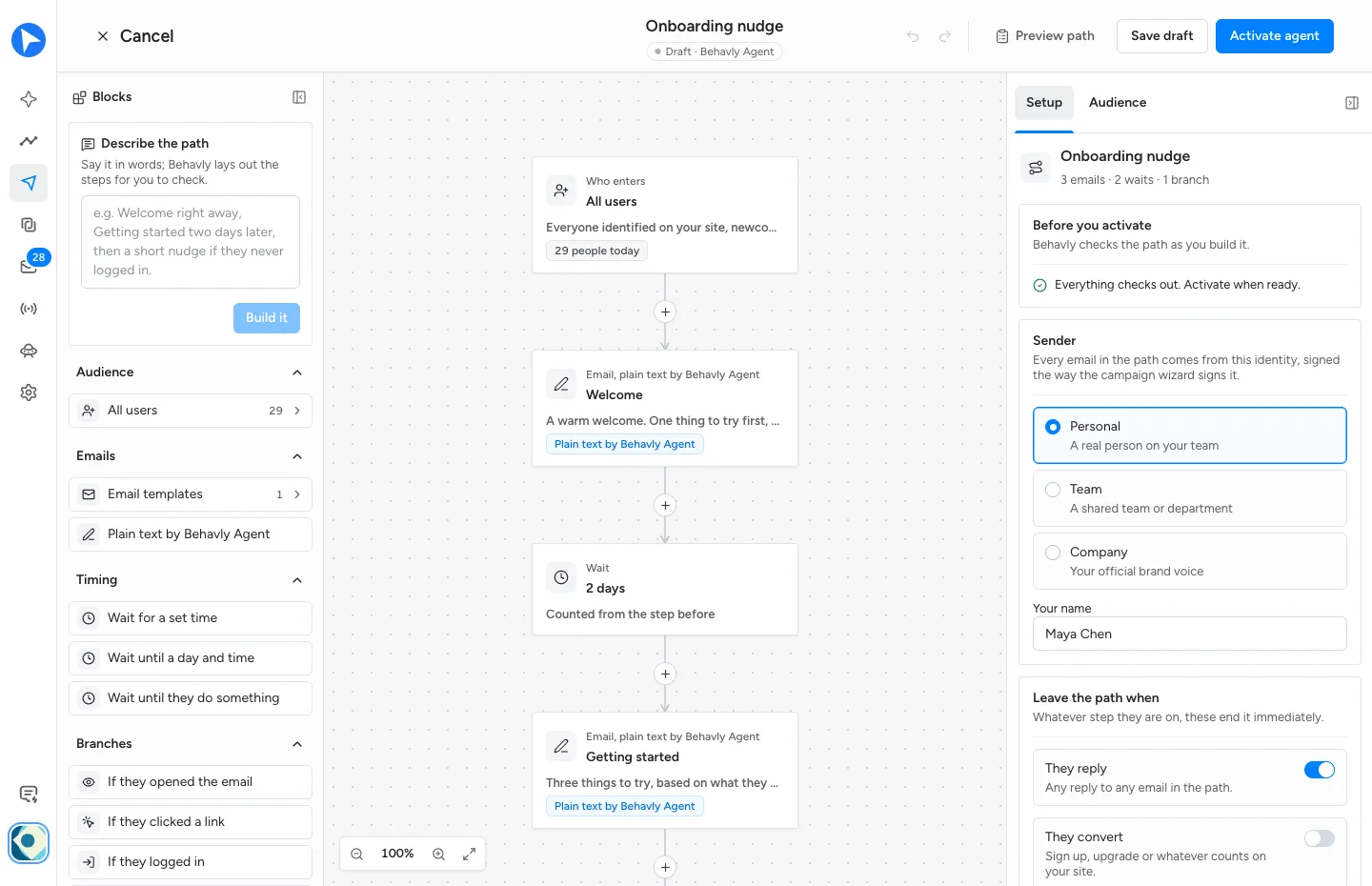
- 3Send once, or keep a path running. A one-time campaign from Campaigns → New Campaign sends to a group now or on a date you choose. A Behavly-Agent campaign keeps running: people enter as they qualify and move along a path of emails, waits and branches on whether they opened, clicked, logged in, visited a page, replied or did an action in your product. Describe the path in words and Build it lays it out.
- 4Let each email be written for one person. Behavly writes every email from that person’s activity, in your sender’s voice and in any of 80 languages, or sends your own copy or template exactly as written.
- 5Send from your own mailbox. Connect it in Settings → Email over IMAP/SMTP. Replies come back to the Inbox with the sender’s activity beside them.
- 6Approve, then measure. You approve the emails before they go out: approval is on by default for one-time campaigns, and Hold Behavly-written emails for approval does the same on an Agent. Give an Agent a Goal and Behavly counts who reaches it and credits the email that came before.
Questions
- What is an example of a behavioral email?
- An email to someone who created a project but never invited a teammate, explaining what changes when their team joins and linking to the invite screen. It goes only to people in that situation, while they’re in it.
- Is behavioral email the same as event-triggered email?
- Mostly. Event-triggered describes the mechanism, an event that starts a send; behavioral email also covers what someone didn’t do, which needs a wait and a condition rather than a single event.
- What data do I need for behavioral email?
- A way to tie activity to a known person, usually their signed-in session, page views inside your app, and a handful of product events for the actions that matter, such as a project created or a plan upgraded.
- Should I use behavioral email or a drip campaign?
- They do different jobs. A drip suits content everyone should get in the same order; behavioral email suits anything where what someone needs depends on what they’ve done, which describes most onboarding, trial and retention email.