
What is an AI follow-up agent? How AI agents write and send follow-up emails
An AI follow-up agent decides when someone should hear from you next and writes that email from what they did. How it works, what to look for, and the risks.
Updated October 10, 2026
An AI follow-up agent is software that reads what someone did, decides when they should hear from you next, writes that email, and sends it or queues it for approval. A template sequence sends the same emails, on the same schedule, to everyone who enters. An agent works one person at a time.
That changes what each person gets. Two people who sign up on the same day can get different emails at different times. One may get none at all, because they already did what the email was going to ask. Each email is written about that person’s own work in your product, not filled in from a template.
AI follow-up agent vs. email sequence vs. AI writing assistant
These three get mixed up, but they split the work in very different ways.
| Email sequence | AI writing assistant | AI follow-up agent | |
|---|---|---|---|
| Who decides timing | You, once, as fixed delays: day 1, day 3, day 7 | You, each time you send | The agent, per person, inside the waits, sending hours and limits you set |
| Who writes | You, once, as a template | The AI drafts; you edit and send each email | The AI writes each email for the person receiving it |
| How personal | Merge tags: first name, company, plan | As personal as the context you give it | Written from that person’s own activity |
| What triggers it | Joining a list, or days since signup | You opening the tool | Something the person did, or didn’t do |
| Who sends | The email platform, on schedule | You | The agent, on its own or after your approval |
The real difference is where the decision sits. A sequence makes no decisions: it does what you set up, for everyone. A writing assistant speeds up your writing but waits for you every time. An agent decides for one person at a time, inside rules you set, and you check its work.
Four kinds of follow-up agents
“AI follow-up agent” covers four quite different kinds of product. Which one you need depends on who you’re following up with, and what the agent can know about them.
- Cold-outreach follow-up agents
- Follow up with prospects who haven’t replied to a sales email. Often sold as AI SDRs or reply agents, they work from a contact list and public information. The usual trigger is silence: no reply after a set number of days. Some also answer replies and book meetings.
- Product follow-up agents
- Follow up with your own users based on what they did in your product: signed up but never finished setup, tried a feature once, hit a plan limit, went quiet. The trigger is behavior, and each email is written from it. This needs activity tied to a signed-in person.
- Personal inbox follow-up tools
- Live in your own email client. When a thread you started goes quiet, they remind you, or draft a short nudge for you to send. They suit one person’s inbox, not follow-ups across a whole user base.
- General agent builders
- Let you wire up your own agent from triggers, AI steps and actions, usually connecting a CRM, a data source and an email provider. Very flexible, but you design the logic, the prompts and the safety checks yourself.
The rest of this page is about the second kind: the agent that follows up with your own users. To compare specific products across all four, see best AI agents for follow-up emails.
How a product follow-up agent works
Whatever the tool, a follow-up agent for your own users has the same seven parts. When one is missing, it shows in the emails.
- 1Tracking signed-in behavior. A script in your app records what each signed-in person does: pages viewed, clicks, and product events such as
project_created. Activity has to be tied to a known person, or there’s nobody to write to. - 2Deciding who qualifies. A rule decides who enters, such as “signed up three days ago and hasn’t created a project”. The agent keeps checking it and enrolls people the moment they match, so it runs for as long as new users arrive.
- 3The path. Each person moves along a path of emails, waits and branches. A wait can be a fixed time or “until they do something”. A branch asks a yes-or-no question: did they open, click, log in, reply, or take the action?
- 4Writing each email. When someone reaches an email step, the agent writes it from that person’s activity, your instructions for the step and what you’ve told it about your product. It should also skip an email whose job is already done, like an “invite your team” email to someone who just did.
- 5Sending from your mailbox. The email goes out from a real address on your domain, inside working hours and under a limit on emails per person. It should look like a note from a colleague, because that’s what it stands in for.
- 6Replies and exits. A reply usually ends the path, since the person is now in a conversation with you. Reaching the goal, unsubscribing and bouncing are the other common exits.
- 7Measuring against a goal. The goal is an action in your product, such as upgrading or inviting a teammate. The agent counts who reaches it and which email came before, which tells you far more than an open rate.
Examples of emails an AI follow-up agent writes
Northwind is a made-up reporting tool for online businesses. These are two emails an agent might write for it, each started by one specific behavior.
Subject: Share your revenue dashboard with your team
Hi Priya,
Your “Monthly revenue” dashboard has been updating on its own since Tuesday. If you invite your team, they see the same numbers you do, and Northwind sends each of them the summary every Monday morning.
Invites take one email address each, and you choose who can edit.
Invite your team: [link]
Sam
Started by: a dashboard created five days ago and no invite_sent event since. The email is about her dashboard, not about what she clicked.
Subject: Your fourth Northwind dashboard
Hi Marcus,
Your fourth dashboard didn’t save yesterday because the free plan stops at three. On Team there’s no dashboard limit, and the three you’ve built keep their filters and Monday emails exactly as they are.
You can move back to free at any time.
Move to Team: [link]
Sam
Started by: a blocked “create dashboard” action, then a pricing page visit the same day. The email names the limit he hit, which he knows about. It leaves out the pricing visit, which would feel like being watched.
What to look for in an AI follow-up agent
- Approval before sending. You should be able to read every written email before it goes, and switch to automatic sending path by path once you trust it. Check the default.
- A path you can read and change. Every email, wait and branch should be visible and editable. An agent whose logic you can’t inspect is hard to trust and harder to fix.
- Where it sends from. Your own mailbox on your own domain makes the email arrive like a note from a colleague, and replies land where you already read mail.
- What data it writes from. An email is only as specific as its inputs. Ask what each one is written from: activity tied to the person, your product description, their company’s website, or just a name and job title.
- Exits on reply. A person who replies is in a conversation now. The path should end on any reply, ignore out-of-office messages, and leave the thread to you.
- Goals and measurement. Opens are unreliable on their own, because some mail apps load images automatically. Look for a goal set as an action in your product, with results for each email step.
- Languages. If your users don’t all read English, check that each email can be written in the recipient’s language, not translated from one fixed template.
- Privacy and consent. Product follow-ups should go only to people who signed up for your product. Check where data is stored, what reaches the AI model and whether personal details are masked first. Unsubscribes must end every path.
Risks and how to avoid them
- Wrong facts in emails. A model fills gaps with plausible details: a feature you don’t have, a discount you never offered. Give it a written description of your product, keep each step’s instructions specific, and read real emails before you stop reviewing them.
- Too many emails. Several paths, each reasonable alone, can add up to an email a day. Set a limit per person, end paths on reply, and skip any email whose action the person already took.
- Creepy specificity. “I saw you spent four minutes on our pricing page” reads like surveillance. Write about what the person made or did in the product and the next step, not about what they looked at.
- Sending without review. The first time you read an AI-written email shouldn’t be after your customer did. Start with approval on, read a few dozen real emails, then decide path by path.
- Deliverability. Automated volume from a new domain or a single busy mailbox can land in spam. Send from an authenticated domain (SPF, DKIM and DMARC), in working hours, with a cap on emails per person, and stop on bounces.
How Behavly’s agent does it
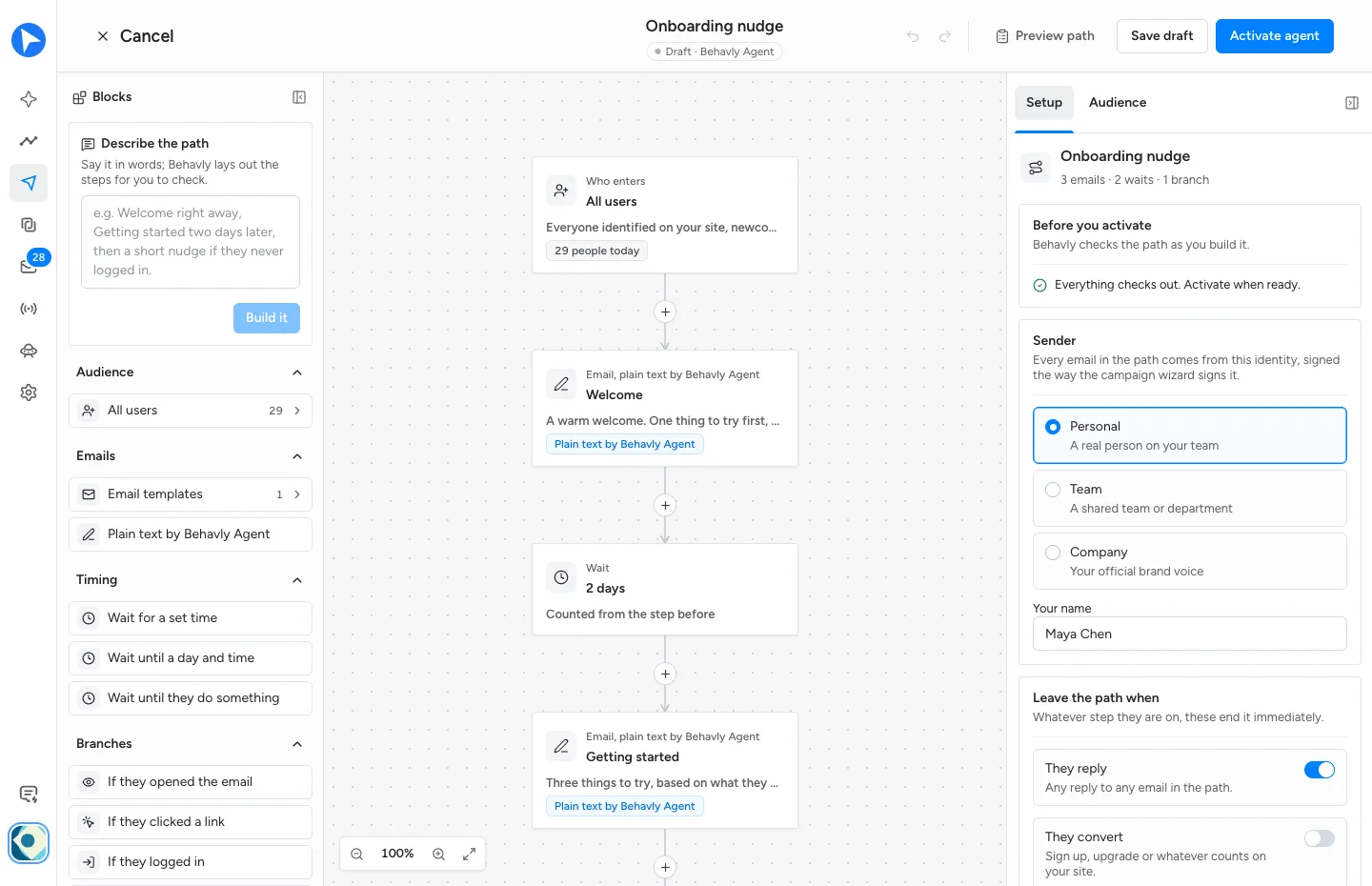
Behavly is an AI agent for SaaS teams. It tracks what each signed-in user does in your product, builds the follow-up paths you describe, and writes every email from that person’s own activity. Its always-on paths are called Behavly Agents, and this is how one runs.
- 1Track. Add the snippet from User Activity → Setup to your site and signed-in app. It ties each visit and click to the signed-in person, across their devices, with no identify call. Product actions such as
project_createdcome in withbehavly.track. - 2Describe the path. In Campaigns → New Campaign, choose Behavly-Agent campaign, say what you want in words at the top of Blocks, and choose Build it. Behavly lays out who enters, the emails, the waits and the branches for you to check. Nothing sends until you activate.
- 3People enter as they qualify. The audience can be all users, a pattern Behavly detected, one you describe in words, form leads or specific people. Behavly re-checks it every 10 minutes, and each person enters once.
- 4Waits and branches. Wait for a set time, until a day and hour, or until they do something. Branch on whether they opened, clicked, logged in, visited a page, replied or did an action in your product. Apple Mail loading images by itself isn’t an open, and a security scanner following a link isn’t a click.
- 5Each email written for one person. Each email step is written from that person’s activity and your instructions for the step, in your sender’s voice and their language. Templates work too, sent as designed or reworded for each person. Skip if they already did it drops an email whose job is done.
- 6Check before it sends. Approval is off by default on an Agent. Turn on Hold Behavly-written emails for approval and every written email waits in Review until you send or skip it. Preview writes any step for a real person, without sending it.
- 7Sent from your mailbox, at a sensible hour. Emails go out from your own mailbox, Monday to Friday, 9:00 AM to 6:00 PM in each person’s timezone by default. The optional At each person’s usual hour setting holds an email for the hour that person is most often on your site, counted from their own visits. By default, nobody gets more than 3 of its emails in 7 days.
- 8Replies come to you. A reply ends the path by default and lands in the Inbox with the sender’s activity beside it. Behavly can draft an answer for you to check and send.
- 9Measure and improve. Set a Goal, an action in your product or a page visit, and Behavly credits each person who reaches it to the last email they got. A/B test tries a second version of any email step on half the people who reach it. Every Monday, once an agent has sent 20 emails, Path review suggests changes, and nothing changes until you apply one.
Questions
- What is an AI follow-up agent?
- Software that reads what someone did, decides when they should hear from you next, writes that email, and sends it or queues it for approval. Unlike a template sequence, it times and writes each email for one person.
- Can an AI agent send follow-up emails automatically?
- Yes. Once it’s active, an agent enrolls people as they qualify and sends each email when its wait ends. Most also let you hold written emails for approval, which is worth doing until you trust what it writes.
- Is an AI follow-up agent the same as an AI SDR?
- No. An AI SDR is one kind of follow-up agent: it follows up with cold prospects who haven’t replied. A product follow-up agent writes to your own users about what they did in your product.
- Do I need to approve AI-written emails?
- Not always, but you should at first. Read real emails written for real people until you trust a path, then decide path by path. In Behavly, approval is on by default for one-time campaigns, and Hold Behavly-written emails for approval turns it on for an Agent.
- What does an AI follow-up agent need to work?
- Activity tied to a known person, usually through their signed-in session, a mailbox to send from, and a written description of your product. Add a goal, so you can tell which emails worked.