
A one-time campaign sends once to the people you pick. A Behavly Agent keeps running: people enter the moment they qualify, and each one is taken along a path you draw — emails, waits, and branches on what that person did.
Starting One
- 1Open Campaigns → New Campaign and give it a name.
- 2Choose Behavly-Agent campaign, then Continue. The Agent builder opens with the name carried across.
- 3Pick Start from scratch, or Use an example to open a ready-made path (Onboarding, Win back quiet users, Feature adoption or Trial ending) and change what you like.
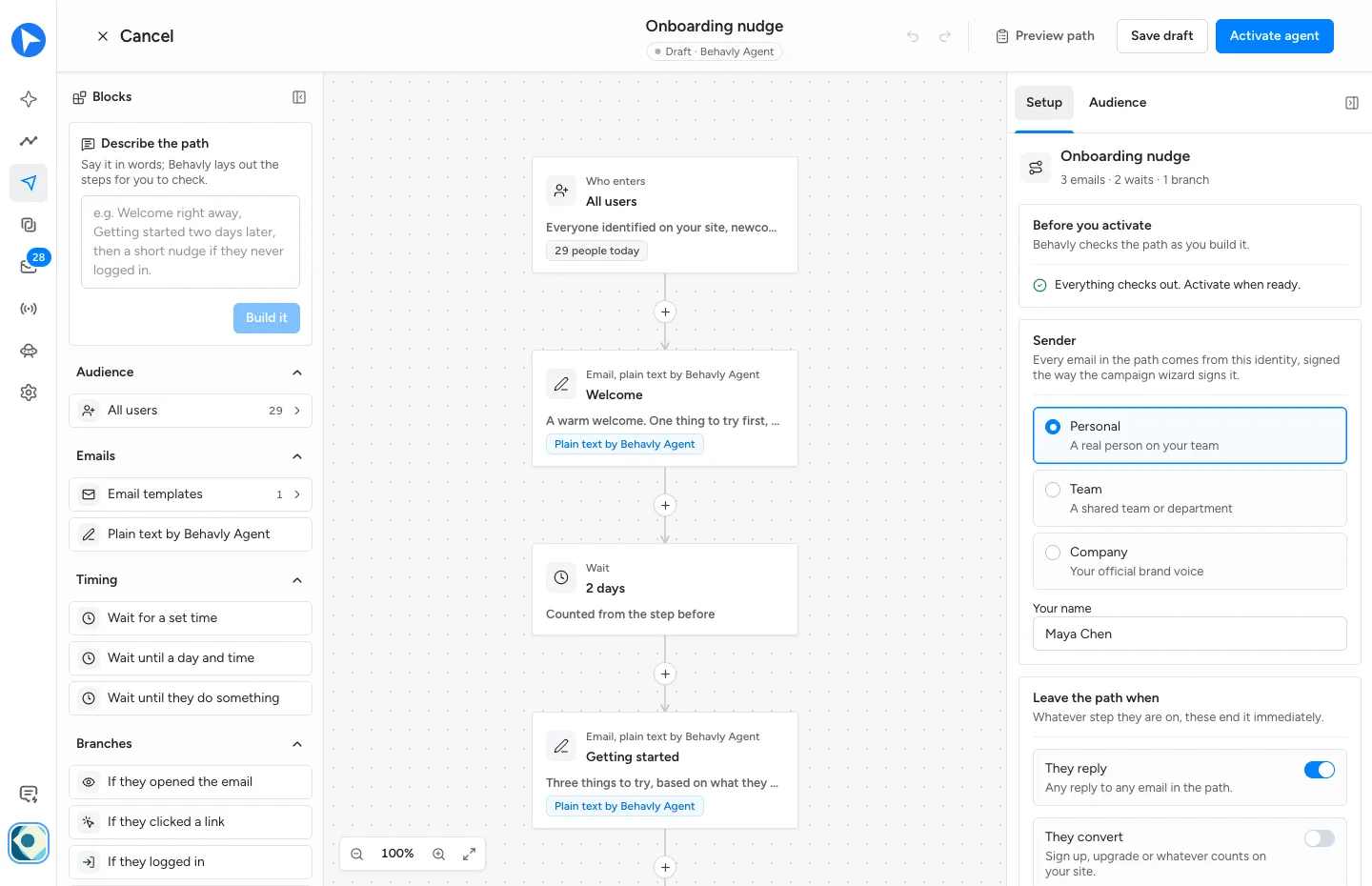
The builder has three parts: Blocks on the left, the path itself in the middle, and on the right a Setup tab for the whole path plus a tab for whichever step is selected. Every connection has a + for adding a step, and blocks can be dragged onto the path.
Agents are on Starter and above. On Free the card shows Locked and choosing it opens the upgrade dialog. See What Counts Against A Limit.
Who Enters The Path
- All users
- Everyone identified on your site, newcomers as they arrive.
- A pattern
- A group Behavly detected or one you saved. Under Looking for another pattern? you can describe a new one in words and Add this pattern; it is saved and used like any other.
- Form leads
- People who left their email in a form or were added to your leads and never signed in. Their emails introduce your product, and for a business lead also draw on their company's website.
- Specific people
- Picked one by one, pasted, or imported from a CSV. Everyone you picked enters.
Behavly re-checks who is in the group every 10 minutes. Each person enters a given agent once, the moment they qualify.
- Enroll people who already match
- Off by default, which means only newcomers enter. Turn it on to bring in the people who are in the group when you activate.
- Allow re-entry after 90 days
- Off by default. Lets someone go through the path again 90 days after they finished it. Never after a reply or an unsubscribe.
Someone who stops matching the group is not taken off the path. Use the exits below for anything that should end it.
The Steps
- Email template
- One of your published templates. Send as designed sends it exactly as you built it, to everyone. Edited by Behavly keeps your design and edits the wording for each person from what they did.
- Plain text by Behavly Agent
- Behavly writes the email for each person, in your sender's voice, from their activity. Instructions for Behavly Agent is where you say what the email is for.
- Wait for a set time
- Hours or days after the previous step.
- Wait until a day and time
- The next matching weekday, at that hour, in each person's own timezone.
- Wait until they do something
- Continues as soon as they act, or after the limit you set (But no longer than N days).
- Branch
- Splits the path on whether they opened the previous email, clicked a link in it, logged in to your site, visited a page or replied — within the number of days you set. Yes goes one way; no goes the other once the days run out.
- Stop the path
- Ends the path for that person.
Signals from your site are picked up as soon as they happen; replies within 10 minutes. A click on the unsubscribe link never counts as a click.
Every email Behavly writes or edits counts toward the AI emails on your plan. Templates sent as designed do not.
Each email goes out as its own message, not as a reply in the same thread as the one before.
Describe The Path
At the top of Blocks, say what you want in words and choose Build it. Behavly lays out the audience, emails, waits and branches for you to check. It replaces the whole path, and Undo brings the old one back. Nothing sends until you activate.
When People Leave
Under Leave the path when in Setup. These end the path immediately, whatever step the person is on:
- They reply
- On by default. A reply to any email on the path ends it.
- They convert
- Off by default. Counts as converting when they trigger a tracked event or visit a page you name.
- They unsubscribe or bounce
- Always on.
Setup For The Whole Path
- Sender
- Personal, Team or Company — the same three voices as a one-time campaign.
- Sending window
- The days and hours emails may go out. Monday to Friday, 9:00 AM to 6:00 PM by default, in each person's timezone (UTC when it is unknown). A wait that ends outside the window holds the next email until it opens.
- Frequency
- Never more than N emails per person every N days — 3 every 7 by default. Counts only the emails this agent sends.
- Rotate all active mailboxes
- On by default. Each person keeps the same mailbox for the whole path.
- Default language
- Detected for each person (English when it cannot be told), or English for everyone. Each written email can also be set to one language.
- Hold Behavly-written emails for approval
- Holds every email Behavly writes or edits in Review until you release it. Templates sent as designed always go on time.
Approval is off by default on an Agent, unlike a one-time campaign. With it off, written emails send as soon as they are ready. Turn it on until you have read enough of what an agent writes to trust it.