Win-back emails for inactive SaaS users
How to tell a SaaS user has gone quiet, when to write, and example win-back emails built on the work that person already did in your product.
Updated October 10, 2026
A win-back email is a message to someone who used your product and then stopped, written to give them one specific reason to return to the work they already started there. It matters because a quiet user has already done the hard part: they found you, signed up, and put something of their own into the product. A win-back email that ignores that history reads like a newsletter. One that starts from it reads like a note from someone who noticed what they were in the middle of.
This guide covers how to tell a user is actually inactive rather than between uses, which signals tell you what to say, when to send, and when to stop. For the wider idea of writing to people based on what they do in your product, see the behavioral email guide.
What counts as an inactive user?
Inactive is relative to how often your product is meant to be used. A payroll tool opened twice a month is not abandoned after ten quiet days; a team chat app probably is. So define inactivity against the product’s natural rhythm, not a round number. Look at the usual gap between sessions for people who are clearly using the product well, and treat someone as quiet once they have gone noticeably longer than that, roughly two or three of their normal cycles.
Before you write anything, split quiet users into three groups, because each one needs a different email:
- Never activated
- Signed up but never reached the first result your product exists to deliver. This is an onboarding problem, not a win-back one: they have no habit to return to. See users who never activated.
- Activated, then faded
- Had a working routine and it lapsed. This is the classic win-back audience, and the one this guide is about.
- Paying, but quiet
- Still on a paid plan with usage falling. Do not wait for them to go fully dormant: that is a renewal at risk. See churn prevention emails.
Which behavior to watch
Last login tells you who to write to. It tells you nothing about what to say. The useful signals are the ones that describe where the person stopped and what they left behind.
| Signal | What it tells you | How to use it |
|---|---|---|
| Last seen | How long they have been gone, measured against their own usual rhythm | Decides who enters the sequence, not what the email says |
| The last thing they did | The page, project or task they were in the middle of | The subject of the first email |
| What they left behind | Projects, drafts, contacts, bookings or data still in the account | The concrete payoff: something of theirs that is waiting |
| Setup steps done and not done | Whether they ever reached the point where the product pays off | Separates faded users from never-activated ones |
| Friction before they left | Repeated visits to one settings page, rage clicks, error pages, help articles | They may have left stuck, not bored: lead with the fix |
| Teammates still active | Whether the account is alive even though this person is not | A strong reason to return: their team’s work is happening without them |
| Billing or downgrade pages visited before going quiet | Cost may be part of the reason | The one case where a price conversation can be appropriate |
Refer to the state of their account, not to the fact that you watched them. “Your Thursday booking page is still live” is helpful. “We saw you open settings three times on Tuesday” is unsettling, even when both come from the same data.
When to send a win-back email
Start when the gap clearly exceeds the person’s normal rhythm. Send too early and you are emailing people who were simply busy, which teaches them to ignore you. Leave it too long and they have replaced you, forgotten their login, or forgotten why they signed up. For most products, three emails over three to four weeks is enough, each with a different job:
| When | Its job | |
|---|---|---|
| 1 | When they cross your quiet threshold | Pick up where they stopped: name the thing of theirs that is still waiting |
| 2 | About a week later, if they have not come back | Remove what stopped them: the fix for the friction, or the one step they skipped |
| 3 | One to two weeks after that | Make restarting cheap: a shortcut that saves them rebuilding what they had |
Then stop. A fourth email can be a single plain question asking what they use instead, which is often the most useful thing a dormant user can tell you, but it is a research email, not a fourth push.
Three exits matter more than the timing:
- They come back. A login ends the sequence immediately. Nothing undoes a win-back faster than a “come back” email arriving the day after someone came back.
- They reply. A reply goes to a person, not to the next automated step.
- They unsubscribe or bounce. Obvious, but check it is wired, not assumed.
Let someone re-enter the sequence only after a long gap, measured in months, so a user who drifts every quarter does not get the same three emails every quarter. Send during their working hours, in their timezone, from a named person whose address accepts replies.
What to write in a re-engagement email
- Lead with their own work. The booking page, the half-finished report, the 40 contacts they imported. Their data is the strongest argument you have, because it is the one thing a competitor cannot offer them.
- One step, one link. Link to the exact screen where the step happens, not to the dashboard or your homepage.
- If they got stuck, say the fix plainly. One sentence on what the step is and where it lives. No apology tour, no feature history.
- Mention a change only if it touches what they used. “Here’s everything we shipped since you left” is a changelog. “Recurring bookings now copy your slot lengths” is a reason, if recurring bookings is what they were setting up.
- Keep the subject line about their thing. A subject that names their project or page gets read as information. “We miss you” gets read as marketing.
- Save the discount. A discount answers one objection, price, and most people who drift away from a product left for other reasons. Use an offer only when their behavior points at cost, such as visiting billing or downgrade pages before going quiet.
Win-back email examples
The examples below use Northwind, a made-up scheduling app for small clinics. Swap in your own product’s nouns; the structure is what carries over. Each one names something the person did, offers one step, and makes one ask.
Subject: Your Thursday booking page is still live
Hi Dana,
The booking page you set up for Thursday physio slots is still live, and two patients have booked through it since you were last in. Both appointments are waiting for you to confirm.
Confirming takes one click per booking from the Upcoming tab.
Here are the two bookings: [link]
Sam
Subject: The one setting behind two-way calendar sync
Hi Dana,
Calendar sync wasn’t switched on when you last set up Northwind, so bookings stayed inside the app instead of reaching your clinic calendar. The step most people miss is choosing which calendar Northwind writes to.
Pick your clinic calendar under Settings, then Sync, and new bookings appear there within a minute.
Here’s the exact screen: [link]
Sam
Subject: Copy your March schedule into next week
Hi Dana,
Rebuilding a week of slots is the slow part of coming back, so you can skip it. Northwind can copy your March schedule, with its 25-minute physio slots and Friday cutoff, straight into next week.
Open Schedules and choose Duplicate on March.
Here it is, ready to copy: [link]
Sam
Subject: Priya’s bookings aren’t on your calendar yet
Hi Dana,
Priya booked 12 appointments through your clinic’s Northwind page this week. Your own calendar isn’t connected to the clinic account, so none of them show up on your side.
Connecting it takes one step and pulls in everything already booked.
Connect your calendar: [link]
Sam
Mistakes to avoid
- Treating every old last-login the same. Never-activated, faded and paying-but-quiet users want three different emails. One blast to all of them fits none.
- Guilt and nostalgia. “We miss you” and “Did we do something wrong?” put your feelings at the center of their inbox. Their work belongs there instead.
- The feature dump. A list of everything new since they left asks them to do the work of finding the one thing that matters to them.
- Leading with a discount. It trains users to go quiet and wait for an offer, and it misreads why most of them left.
- No exit on return. If the sequence does not stop the moment they log in, someone who came back gets told to come back.
- Narrating surveillance. Describe the account, not the clickstream.
- Sequences that never end. After three unanswered emails, stop. Continuing to mail people who never open hurts how mailbox providers treat the rest of your mail.
- Sending from a no-reply address. Win-back replies are where you learn why people leave. Make sure they reach someone.
How to run win-back emails in Behavly
Behavly records what each signed-in user does in your product and writes every email from that person’s own activity, so the “where they stopped” part of a win-back email is filled in for you.
- 1Install the tracking snippet from User Activity → Setup on your signed-in pages, not only your marketing site. It attaches page views and clicks to the person who was signed in, with no identify call to wire up.
- 2Connect the mailbox you want to send from in Settings → Email. Emails go out from your own address over IMAP/SMTP, and replies come back into the Inbox with the person’s site history attached.
- 3Define who is quiet. Pick a pattern Behavly found, or describe one in plain language, such as “people with at least five sessions who haven’t been seen for 30 days”. You see the group and its size before anything is saved, and a saved pattern re-runs on current data every time it is used.
- 4For a single send, create a one-time campaign in Campaigns → New Campaign, choose that pattern as the audience, and let Behavly write each email from what that person last did. A scheduled send reads behavior fresh right before it goes out.
- 5For an always-on win-back (Agents are on Starter and above), choose a Behavly-Agent campaign and start from the Win back quiet users example, or describe the path in words and choose Build it. A typical path: an email, a 7-day wait, a branch on logged in to your site, a second email for those who didn’t, and Stop the path for those who did.
- 6Turn on Enroll people who already match if you want the people who are quiet today, not only those who go quiet from now on. Replies end the path by default.
- 7Use Preview on any email step to read what Behavly writes for a real person in the audience, and turn on Hold Behavly-written emails for approval so you approve the emails before they go out.
Someone who stops matching the group is not taken off an Agent path on its own, which is why the branch on logged in to your site matters: it is what stops a returning user from getting the next email. Behavly writes from the activity still on record, so set retention in Settings → Account & Settings → AI & Privacy longer than the quiet window you target; your plan sets the ceiling, from 30 days to a year.
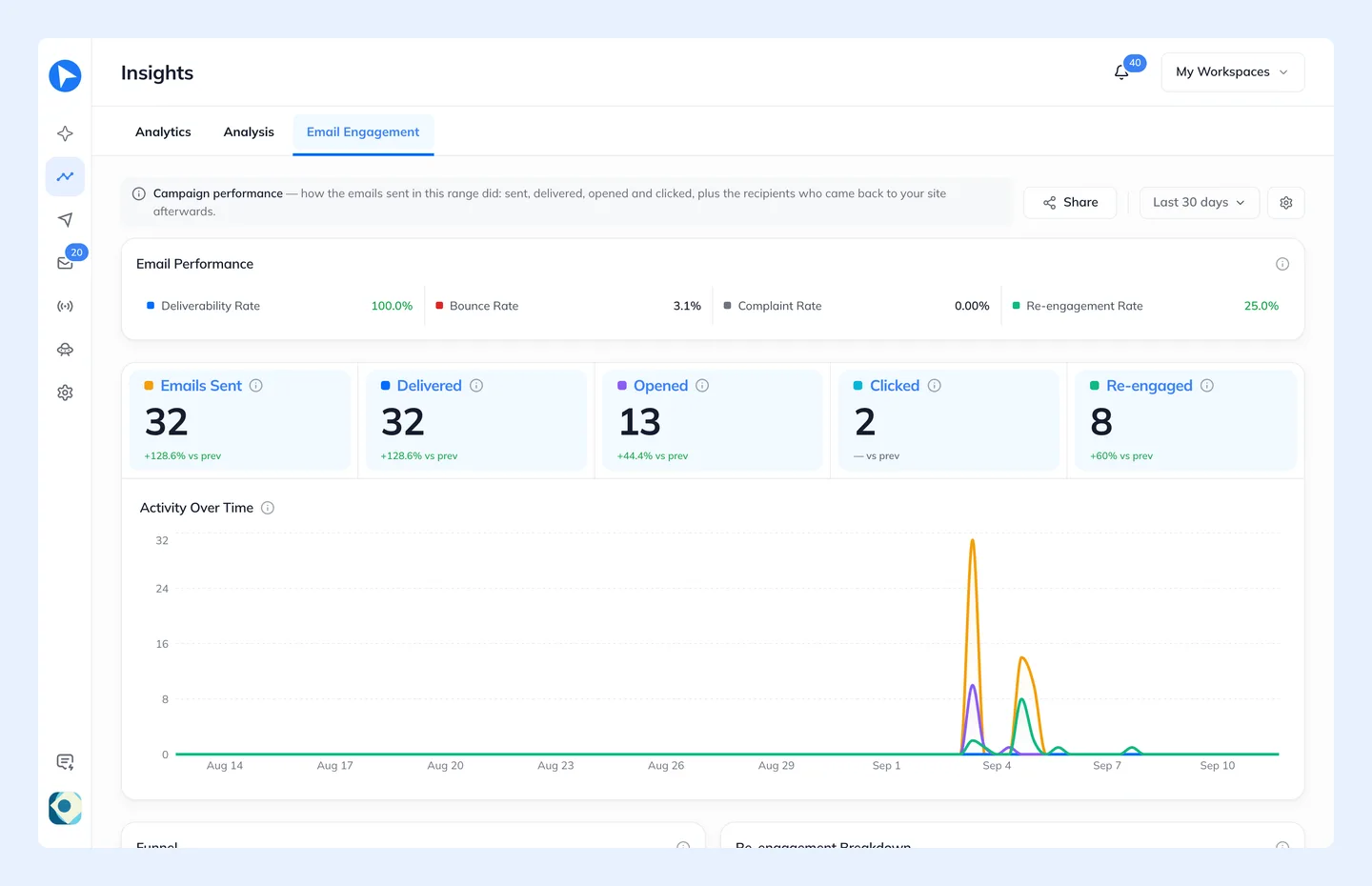
To see whether it works, set the Agent’s Goal to a page visit, for example a URL that Starts with your app’s path, and Behavly credits each return to the last email the person got before it. Insights also shows a re-engagement breakdown and the median time to re-engage.
Questions
- When should you send a win-back email?
- When someone has gone clearly longer than their normal gap between sessions, usually two or three of their usual cycles. Earlier and you email people who were just busy; much later and they have often replaced you or forgotten why they signed up.
- How many re-engagement emails should you send?
- Three is enough for most products: one that picks up where they stopped, one that removes what stopped them, and one that makes restarting easy. Stop at the first sign of life, whether that is a login, a reply or an unsubscribe.
- Should a win-back email include a discount?
- Not by default. A discount only answers price, and most users who drift away left for other reasons. Keep offers for people whose behavior points at cost, such as visiting billing or downgrade pages before going quiet.
- What is the difference between a win-back email and a churn prevention email?
- Churn prevention goes to customers who are still active but whose usage is falling; win-back goes to people who have already stopped. The first protects a renewal, the second restarts a habit. See churn prevention emails.
- What makes a good re-engagement subject line?
- One that names their own work: the project, page or data they left behind. A line like “We miss you” tells the reader nothing they would want to open the email for.