
Churn prevention emails: what to send when usage drops
How to spot an at-risk SaaS customer from their usage, what to send before they cancel, and example churn prevention emails tied to what changed.
Updated October 10, 2026
A churn prevention email is a message to a paying customer whose usage has started to fall, sent before they decide to cancel and written about the specific thing that changed in their account. A cancellation is usually the end of a decline, not the start of one: logins thin out, the person who championed the tool stops showing up, a workflow quietly moves somewhere else. By the time someone clicks Cancel, the decision has mostly been made. The window where an email can help is the drop, not the exit.
This guide covers how to read a usage drop, when to write, what to say for each kind of drop, and what to avoid. It is for customers who are still paying. For people who have already stopped, see win-back emails; for the general approach, see the behavioral email guide.
Signs a SaaS customer is about to churn
A health score is only as good as the behavior under it. These are the signals worth watching, and each one points at a different email:
| Signal | What it may mean | What to send |
|---|---|---|
| Sessions falling against their own baseline | The habit is weakening | A note about the workflow they used most, and the quickest way back into it |
| The core action slows down: fewer reports sent, invoices created, tickets answered | The job may be moving to another tool or process | The shortcut that makes the job easier here, or a direct question |
| The champion goes quiet while others continue | The person who chose the tool left or changed role | A note to the people still active, about who owns the account now |
| Seats nobody uses | They are paying for more than they get, and will notice at renewal | Help activating those seats, or an honest offer to remove them |
| Friction: rage clicks, error pages, repeated visits to the same help article | They are stuck, not bored | The fix, first |
| An integration disconnected or an import stopped | Your product has been cut off from their workflow | What stopped flowing, and how to reconnect |
| Visits to billing, downgrade, cancel or export pages | They are weighing whether to leave | A short personal note from someone who can actually help |
| Renewal approaching with low usage | Price is about to be compared with value | A recap of what they got, then an offer to talk |
Compare each account with its own history, not with a global average. A team that logs in once a week by design is healthy at once a week. The signal is a change: the same account doing noticeably less than it used to.
When to send an at-risk customer email
Trigger on a sustained change, not a single quiet day. A week off is a holiday; two or three weeks well below their usual level is a trend. Waiting that long filters out the noise without waiting so long that the customer has already made other plans.
| Situation | When | Who it comes from |
|---|---|---|
| Usage down against their baseline for two to three weeks | As soon as the trend is clear | The person who looks after the account, or a named product person |
| Integration disconnected or data stopped flowing | Within a day | Whoever can help them reconnect |
| Friction on a specific screen | Within a day or two, while it is fresh | Support, with the fix in the email |
| Billing, downgrade or cancel pages visited | The same or next working day | A real person, writing personally |
| Low usage ahead of an annual renewal | Well before the renewal date, while there is time to fix something | The account owner on your side |
Two or three emails is enough, each with a different job. Stop the moment usage recovers, meaning they are back doing the core action, not just logged in once. Stop when they reply, and get that reply to a person quickly; an at-risk customer who writes back and waits two days has their answer about how much you care. If they cancel, they move to your win-back emails, not further down this sequence.
What to write when a customer’s usage drops
- Name what changed, in their terms. “The Billing queue has 23 open tickets and the oldest has waited six days” is something they can act on. “We noticed you’ve been less active” is something they can only feel bad about.
- Offer the one thing that restores the value. A rule, a shortcut, a reconnect. Not a feature tour, and not a newsletter.
- When the signal is friction, lead with the fix. One sentence on the step, one link to the screen.
- When the champion has gone, write to the people still there. They are the ones who will decide whether to keep paying, and they may not know how the account was set up.
- When seats sit unused, offer to remove them. It costs you some revenue now, but a customer who feels overcharged tends to leave at renewal, while one you helped save money has one less reason to.
- When they visit cancel pages, do not block them. Send a short, human note asking what is not working, and offer to fix it or to help them export cleanly. Either answer is useful.
- Keep retention offers for the cancel step, if you use them at all. A discount in the first usage email teaches customers that using less earns a lower price.
Churn prevention email examples
These use Kestrel, a made-up shared support inbox for small teams. Each one is tied to a specific change in the account.
Subject: 23 open tickets in the Billing queue
Hi Priya,
The Billing queue in Kestrel has 23 open tickets, and the oldest has waited six days. Through August your team cleared it every day.
If it’s down to one person now, an assignment rule can split new tickets between Tom and Ana as they arrive, so nothing sits.
Set up the rule: [link]
Greg
Subject: Shopify orders stopped reaching Kestrel
Hi Priya,
Kestrel stopped receiving your Shopify orders on September 12, when the store connection was removed. Since then, tickets about orders arrive without the customer’s order details beside them.
Reconnecting takes about a minute and pulls in the orders from the gap.
Reconnect Shopify: [link]
Greg
Subject: Two Kestrel seats nobody has used yet
Hi Priya,
Your plan has five seats, and Sam and Lee haven’t signed in since you invited them in July. If they’re meant to help with the Returns queue, a fresh invite takes them straight there.
If they’re not, you can drop to three seats and pay for what your team uses.
Manage your seats: [link]
Greg
Subject: Before your renewal on November 3
Hi Priya,
Your Kestrel plan renews on November 3. Over the past three months your team answered 1,900 tickets, most of them in the Billing queue, with a median first reply under two hours.
If something isn’t working, 15 minutes with me is usually enough to fix it, or to help you move your data out cleanly.
Pick a time that suits you: [link]
Greg
Mistakes to avoid
- Waiting for the cancel button. An exit survey tells you why they left. It does not give you a chance to change it.
- Benchmarking against everyone. A global “healthy usage” number flags light-by-design accounts as at risk and misses heavy accounts that are quietly halving.
- “We noticed you haven’t logged in.” It is guilt dressed as concern, and it gives the reader nothing to do.
- Turning up the newsletter. Sending at-risk customers more of what they are already ignoring will not reverse the trend.
- Leading with a discount. It cheapens the product before you know what is actually wrong.
- Making cancellation hard. It turns a lost customer into an angry one who tells other people.
- Writing to the wrong person. The champion who stopped logging in is not reading. The teammates still using the product are.
- Automated replies to a human answer. When an at-risk customer replies, a person should answer, quickly.
- No stop when usage recovers. A customer back to normal should not get the third email in a sequence about how quiet they have been.
How to run churn prevention emails in Behavly
Behavly keeps one activity record per signed-in person, merged across their devices, and writes each email from what that person did, so the “what changed” part of the email comes from their own history.
- 1Install the tracking snippet from User Activity → Setup on your signed-in pages. It records page views, clicks and scroll depth per person, with no identify call. For the core action itself, such as
ticket_replied, send an event from your product withbehavly.trackso a path can check whether people are still doing it. - 2Find who is at risk. Behavly suggests patterns it found in your tracking, such as people who went quiet or got stuck, or you can describe one in plain language: “people with at least ten sessions who haven’t been seen for 14 days”. You see the group and its size before it is saved. Heatmaps shows rage clicks and dead clicks along with the people behind them.
- 3Before writing to an important account, open the person in User Activity → Identified Users. Their row shows pages, sessions and last seen, and its heatmap button shows what that one person did across every browser they used.
- 4Create a Behavly-Agent campaign in Campaigns → New Campaign with the at-risk pattern as who enters, and turn on Enroll people who already match so customers who are slipping today are included. Choose the Personal sender so emails read as coming from a real person on your team.
- 5Add a Plain text by Behavly Agent step with Instructions for Behavly Agent such as: name the workflow that slowed down, offer one fix, no discount. Then Wait until they do something for your core action, But no longer than 7 days.
- 6Before each later email, add a Branch on did an action in your product or logged in to your site, with Stop the path on the yes side. Someone who stops matching the group is not taken off a path on its own, so this branch is what keeps a recovered customer from getting the next email. A Branch on visited a page (Starts with
/settings/billing, for example) can route people who look at billing to a shorter, more personal email. - 7Use Preview to read what Behavly writes for a real customer, and turn on Hold Behavly-written emails for approval so you approve the emails before they go out.
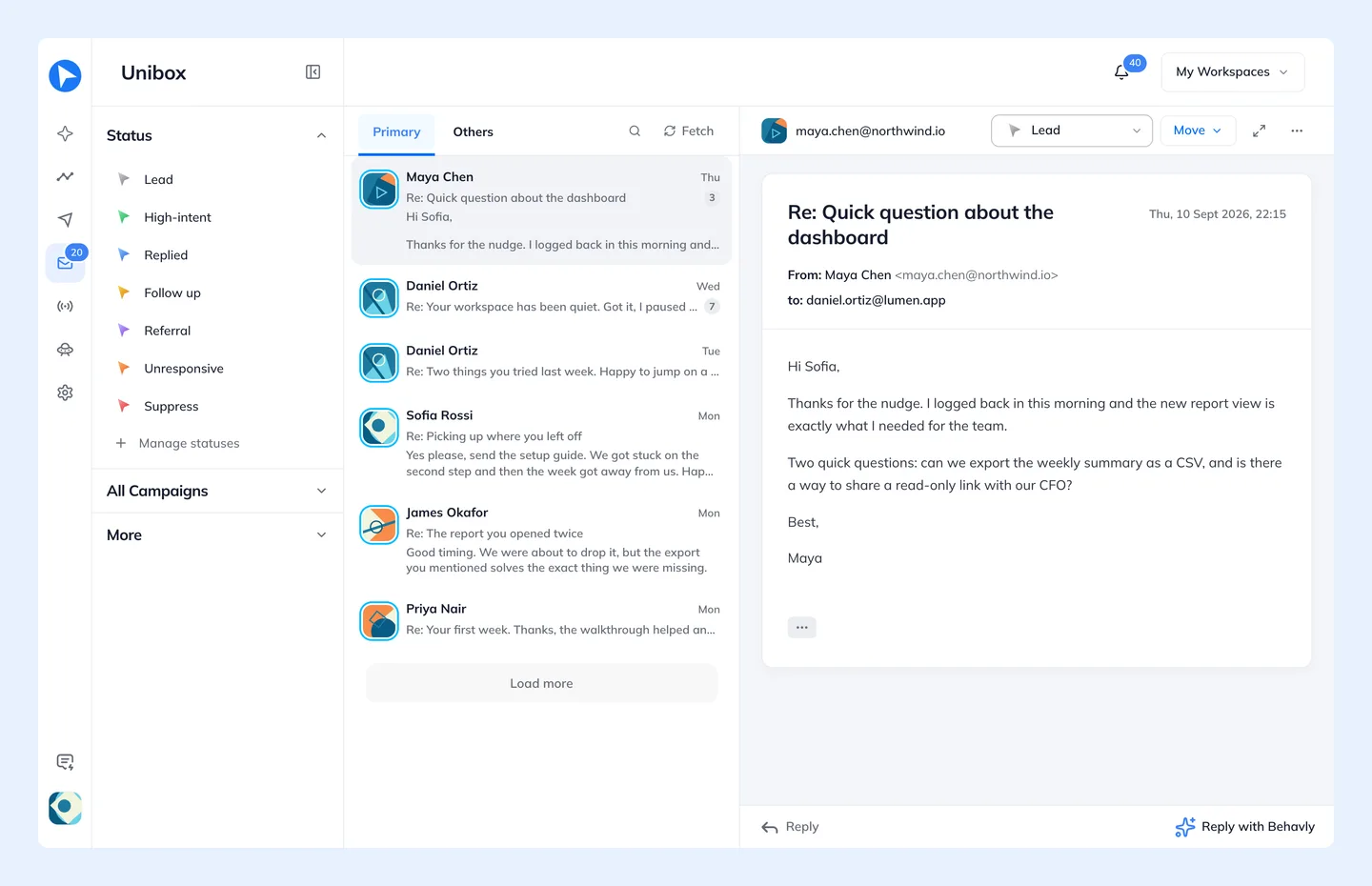
Emails go out from your own mailbox, connected in Settings → Email, and a reply ends the path by default. Replies arrive in the Inbox with the customer’s site history attached and are filed by status, such as High-intent or Follow up, so the ones that need a person get one. On an Agent, Behavly can also draft a suggested answer for you to check and send.
Agents are on Starter and above. On the free plan, a one-time campaign to the at-risk pattern reaches the customers who match it today, with each email written from that customer’s activity.
Questions
- What is a churn prevention email?
- An email to a paying customer whose usage is falling, sent before they decide to cancel and written about the specific thing that changed in their account. Its job is to restore the value they were getting, not to argue them out of leaving.
- What are the early warning signs of SaaS churn?
- Sessions or core actions falling against the account’s own baseline, the main user going quiet, unused seats, repeated friction, disconnected integrations, and visits to billing, downgrade or cancel pages. Each one calls for a different email.
- When should you send an at-risk customer email?
- Once a drop has lasted two or three weeks, or within a day for sharp signals such as a disconnected integration or a visit to the cancel page. Low-usage accounts approaching an annual renewal should hear from you well before the renewal date.
- Should churn prevention emails offer a discount?
- Not as the first move. A discount in a usage email teaches customers that using less earns a lower price; fix the cause first, and keep any retention offer for the cancellation step.
- Who should a churn prevention email come from?
- A real person who can answer, usually whoever looks after the account. At-risk customers often reply with the actual problem, and that reply needs to reach someone who can act on it.