Mouseflow alternatives in 2026: 7 tools compared, free and paid
Seven Mouseflow alternatives compared on free plans, price, heatmaps and mobile apps, plus Mouseflow vs Microsoft Clarity, Fullstory and Smartlook.
By Ardit Karavidaj, Founder & CEO, FoundryX · Updated October 31, 2026 · Competitor details checked October 31, 2026 on each vendor’s own site
The best Mouseflow alternatives in 2026, matched to what you need instead, are Behavly, Microsoft Clarity, PostHog, Fullstory, Contentsquare, Lucky Orange and Crazy Egg. The right one depends on what pushes you off Mouseflow: paying more for each step up in sessions, heatmap types and form analytics held back for the upper plans, no recording of native mobile apps, or no way to act on what the recordings show.
- Behavly (our product): for web apps where users sign in, giving every person a heatmap of their own and an email written from what they did.
- Microsoft Clarity: the free swap, uncapped on traffic, covering websites and mobile apps.
- PostHog: product analytics, replay and event-triggered email under one roof.
- Fullstory: a free plan 60 times Mouseflow’s, with replay and product analytics built for company scale.
- Contentsquare: Hotjar’s home now, so the pick if Hotjar was also on your shortlist.
- Lucky Orange: Mouseflow-style website recordings and heatmaps plus live chat, with no feature held back by plan.
- Crazy Egg: landing-page heatmaps with A/B testing alongside.
Every price and feature below comes from the vendor’s own pages, read on October 31, 2026, and is linked where it appears. When a vendor leaves something unpublished, the entry says so rather than guessing. Behavly, our own product, is listed first, and its details come from the Behavly Help Center.
What Mouseflow gives you, plan by plan
Mouseflow is session replay and heatmaps for conversion and UX work on websites. Most reasons to look elsewhere show up in its pricing table, where many of the features it’s known for sit on the higher plans. The page shows no currency symbol.
| Mouseflow plan | Per month, billed yearly / monthly | Sessions a month | Data kept | What the plan adds |
|---|---|---|---|---|
Free | 0 | 500 | 1 month | Session replays, friction detection, click, scroll and geo heatmaps; 1 website, 1 funnel |
Essential | 25 / 39 | 5,000 | 3 months | Ask Mina AI; 1 website, 1 funnel |
Advanced | 109 / 149 | 25,000 | 6 months | Attention, movement, interactive and friction heatmaps, feedback surveys; 2 websites, 5 funnels |
Premium | 319 / 399 | 100,000 | 12 months | Form analytics, data export, REST API, MCP; 5 websites, 10 funnels |
Enterprise | Custom | Custom | Custom | Journey analytics, SSO |
Two more limits come from Mouseflow’s own pages. Its JavaScript API docs say identifying a visitor is “only available on select plans”, without listing which. And its comparison with Smartlook states that Mouseflow doesn’t track native mobile apps: it records websites, including visits from most mobile browsers. It also doesn’t send email to the people you watched.
Mouseflow alternatives at a glance
| Tool | Pick it for | Free tier | Paid plans from | Heatmap types | Native mobile apps | Emails the people it tracks? |
|---|---|---|---|---|---|---|
Behavly | Following up on what each signed-in user of a web app did | Yes, with no time limit: 100 tracked contacts and 10,000 anonymous pageviews a month | $79/month (2,500 tracked contacts, 100,000 pageviews) | Click, rage-click, movement and scroll layers, for all users or a single user | Websites and web apps, in the browser on any device | Yes: Behavly Agent emails written from each person’s activity, sent from your mailbox or an email service |
Microsoft Clarity | Replay and heatmaps at no cost | Free with no traffic limit | No paid plan | Click (rage and dead clicks included), scroll, area, conversion and attention | Android, iOS, React Native, Flutter | No |
PostHog | Analytics, replay and messaging together | Monthly: 1M events, 5,000 web recordings, 2,500 mobile recordings | Usage-based, e.g. $0.005 per web recording | Heatmap, clickmap, scrollmap | Android, iOS, React Native, Flutter | Yes, via Workflows; your team writes the templates |
Fullstory | Replay plus product analytics for large teams | 30,000 sessions a month for up to 10 users; 12 months of data | Prices not published | Click, scroll | Paid add-on | No; it sends signals on to other tools |
Contentsquare | Hotjar’s recordings and heatmaps, now part of Contentsquare | As many as 200,000 sessions a month | $39/month on yearly billing (7,000 sessions) | Click, move and scroll; zone-based on Growth and up | SDKs for Android, iOS, React Native, Flutter and more | No |
Lucky Orange | Website recordings with live chat | No; a 7-day trial instead | $32/month on yearly billing (3,500 sessions) | Dynamic maps of clicks, scrolling and movement | Its pricing page doesn’t say | No; it reaches visitors on your site with chat, surveys and announcements |
Crazy Egg | A/B tests beside landing-page heatmaps | Yes, with unstated limits | $29/month on yearly billing (5,000 pageviews) | Click, scroll, confetti, overlay and list views | Its pricing page doesn’t say | No; calls to action on your own site |
Mouseflow (for reference) | Detailed heatmaps on a website | 500 sessions a month, 1 month of data | 25 a month on yearly billing (5,000 sessions); no currency shown | Click, scroll and geo; Advanced adds attention, movement, interactive and friction | Web only | No |
Behavly
Behavly is our product. Mouseflow shows you what visitors did on a page; Behavly also tells you which of your users did it, and writes to them about it.
Behavly’s heatmap paints four layers on your live site (clicks, rage clicks, movement and scroll), for everyone at once or for one named user. For whatever dates you pick, tiles over the people table total the clicks, rage clicks, dead clicks and scroll depth. Mouseflow identifies visitors only on select plans; Behavly’s script tag recognizes the signed-in session by itself, with no identify call to write, so every identified person has their own heatmap, merged across all the browsers they’ve used.
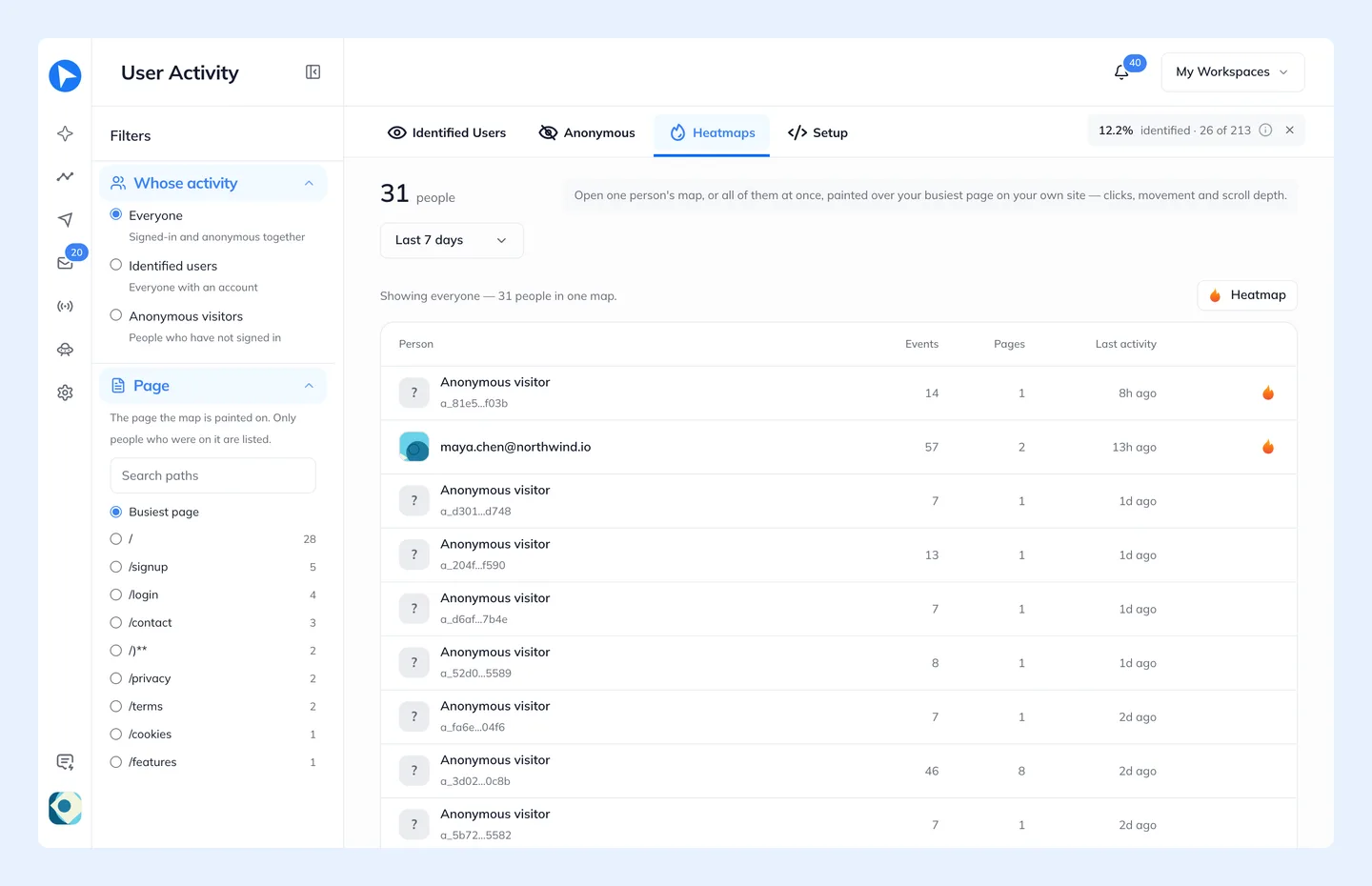
That’s where Mouseflow stops and Behavly carries on. A Behavly Agent step in a campaign writes an email for one person from what they did, then sends it from your own mailbox or through a service such as Amazon SES, Postmark or Resend. For a user whose calendar connection failed, it could read like this:
Subject: Connecting your calendar
Hi Dana,
You pressed Connect on Calendar settings a few times yesterday, and the connection didn’t finish. That usually means the browser blocked the Google sign-in pop-up.
Allow pop-ups for Larkspur, press Connect once more, and your bookings start syncing within a minute.
Connect your calendar: [link]
Tom
Turn on Review and each email waits for your approval before it sends.
- Where it’s strong
- Going from one user’s heatmap to an email for that user in the same product, which Mouseflow doesn’t do. Heatmaps come with every plan, the free one too, and the snippet keeps no IP addresses.
- Built for
- Sites and web apps people sign in to. A single script tag follows each signed-in user across browsers, so a follow-up can mention what that person actually did.
- Pricing
- Mouseflow charges by sessions; Behavly charges by the people you track. The Free plan has no time limit and includes 100 tracked contacts, 10,000 anonymous pageviews and 50 personalized emails a month, keeps 30 days of behavior data, and puts no plan limit on always-on and Trigger Campaigns. The first paid plan, at $79/month, keeps 90 days of behavior data and covers 2,500 tracked contacts and 100,000 pageviews a month.
Microsoft Clarity
For a lot of teams leaving Mouseflow, Microsoft’s free Clarity is the first thing to test. Alongside session recordings it draws click, scroll, area, conversion and attention maps, and its click maps can isolate dead, rage, error, first and last clicks. Funnels, smart events and Copilot summaries come included, and mobile SDKs cover Android, iOS, React Native and Flutter.
- Where it’s strong
- Free at every traffic level: there’s no paid plan, no traffic limit and no sampling, with unlimited projects and team members. Mouseflow’s free plan ends at 500 sessions a month.
- Where it falls short
- Mouseflow’s Advanced and Premium plans keep 6 or 12 months of data; Clarity holds recordings for 30 days (your favorites and a random sample stay up to 9 months) and heatmaps for up to 9 months. Surveys and form analytics, both part of Mouseflow, aren’t on its feature list. Microsoft says not to use it on sites or apps meant for people under 18, and it has no way to contact your users.
- Pricing
- Free; there is no paid tier.
PostHog
Where Mouseflow centers on replay and heatmaps, PostHog is a product analytics suite for software teams that has both, next to surveys, feature flags, experiments and error tracking. Once its identify call runs, a visitor’s anonymous history joins their signed-in profile, and Workflows can send email, Slack messages or SMS when an event fires in PostHog.
- Where it’s strong
- Every product has its own free allowance that renews monthly, no credit card needed: 5,000 web recordings (against Mouseflow’s 500 free sessions), 2,500 mobile recordings, 1 million events and 10,000 workflow emails. Mobile replay records Android, iOS, React Native and Flutter apps, which Mouseflow can’t.
- Where it falls short
- Engineers set it up: someone has to define the events and identify calls, and every email is a template your team writes. Free recordings last up to 30 days, heatmap data is gathered on 3 pages, and the toolbar shows heatmaps only on pay-as-you-go. Its three heatmap views (heatmap, clickmap and scrollmap) are fewer than Mouseflow offers.
- Pricing
- Free up to each monthly allowance. Past it you pay per unit, at rates that drop as volume grows: $0.005 per web recording, $0.01 per mobile recording, $0.00005 per event and $0.003 per email.
Fullstory
Fullstory reaches further into product analytics than Mouseflow does, and it’s aimed at larger product and digital teams. Next to session replay it has live session viewing, developer tools, click and scroll maps, funnels, journeys and retention analysis. Sessions link to your own user IDs once you call setIdentity.
- Where it’s strong
- Its free plan is 60 times the size of Mouseflow’s, with 30,000 sessions a month for up to 10 users and 12 months of data kept. Through Activation, behavioral signals flow on to tools like Braze, Intercom and Zapier.
- Where it falls short
- Paid prices come only on request, where Mouseflow lists its own. Surveys and mobile analytics cost extra as add-ons, and Dashboards and StoryAI aren’t on the free plan. Its heatmaps are click and scroll maps, without Mouseflow’s geo, movement and friction types, and it sends no email.
- Pricing
- Paid tiers (Business, Advanced and Enterprise) are priced on request; the free plan is as described above.
Contentsquare
Contentsquare is where Hotjar ended up: hotjar.com redirects there, and you can’t open a new Hotjar account. For Mouseflow’s jobs, its Experience Analytics product has replays, click, move and scroll heatmaps, funnels, and error and performance monitoring, while surveys sit in Voice of Customer. Unlike Mouseflow, it covers native apps too, documenting mobile SDKs for Android, iOS, React Native, Flutter, Capacitor and Cordova.
- Where it’s strong
- No free plan here is bigger: as many as 200,000 sessions a month, 5% of them (up to 10,000) captured as replays, with heatmaps, funnels and basic surveys included.
- Where it falls short
- Data on the free plan lasts 1 month, as on Mouseflow Free. Filtering by user ID, journey analysis and zone-based heatmaps need the paid Growth plan, and it doesn’t email your users.
- Pricing
- Experience Analytics Growth from $39/month on yearly billing for 7,000 sessions ($49 if paid monthly), keeping 13 months of analytics data and 2 months of replays.
Lucky Orange
Lucky Orange matches Mouseflow on the website basics: session recordings, conversion funnels, form analytics and dynamic heatmaps, whose click, scroll and move maps capture dropdowns and pop-ups too. On top of that it shows who is on your site right now, and lets you reach those visitors in the moment with live chat, surveys and announcements.
- Where it’s strong
- Every feature on every plan and unlimited team members, so form analytics comes with the cheapest plan rather than Premium.
- Where it falls short
- There’s a 7-day trial but no free plan. Data is stored for 60 days unless you pay for 90, 180 or 365. The pricing page talks only about websites, with no word on mobile apps, and it sends no email.
- Pricing
- Build is $32/month billed yearly for 3,500 sessions, or $39 paid monthly. Grow covers 10,000 sessions at $72/month billed yearly, and each extra website is $5.
Crazy Egg
Crazy Egg is heatmaps and testing for marketing sites, so it suits Mouseflow users whose work is mostly landing pages. It has click, scroll, confetti, overlay and list views, unlimited surveys, funnel reports and recordings up to a cap; A/B testing, error tracking and calls to action arrive with the Plus plan.
- Where it’s strong
- A/B tests next to the heatmaps, with unlimited domains and team members and no overage charges on any plan. Recordings are stored for 6 months on Starter and 2 years on the plans above it.
- Where it falls short
- Starter caps recordings at 50 a month and heatmap reports at 5. The pricing shows yearly billing only, we couldn’t find documentation on identifying signed-in users, and it sends no email.
- Pricing
- Starter is $29/month billed yearly for 5,000 tracked pageviews and 50 recordings; Plus, also billed yearly, is $99/month for 150,000 pageviews and 1,000 recordings. Each plan begins with a 30-day free trial. There is a free plan too, with limits it doesn’t state.
Mouseflow vs Microsoft Clarity, Fullstory and Smartlook
| Mouseflow | Microsoft Clarity | Fullstory | |
|---|---|---|---|
Free plan | 500 sessions a month, 1 month of data | Free, no traffic limit; recordings kept 30 days | 30,000 sessions a month for up to 10 users; 12 months of data |
Paid plans | From 25 a month on yearly billing (5,000 sessions); no currency shown | None | Priced on request |
Heatmaps | Click, scroll and geo; Advanced adds attention, movement, interactive and friction | Click, scroll, area, conversion, attention | Click, scroll |
Native mobile apps | No, web only | Android, iOS, React Native, Flutter | Paid add-on |
Signed-in users | Identify on select plans only | Identify API, ID hashed in the browser | setIdentity |
Emails users? | No | No | No; sends signals on to other tools |
Mouseflow vs Microsoft Clarity
Clarity is free with no traffic limit and records mobile apps; Mouseflow’s free plan stops at 500 sessions and records websites only. Mouseflow has more heatmap types, including geo, movement and friction, plus feedback surveys from Advanced and form analytics on Premium, and keeps up to 12 months of data against Clarity’s 30 days of recordings. Pick Clarity for free coverage at any traffic, and Mouseflow when form and friction analysis on a website is the job.
Mouseflow vs Fullstory
Fullstory’s free plan is far bigger (30,000 sessions a month against 500) and keeps 12 months of data. It adds product analytics, live session viewing and mobile capture as an add-on, but its paid prices are only on request. Mouseflow publishes its prices and has more heatmap types for website work.
Smartlook vs Mouseflow
A new account can’t choose Smartlook anymore. According to its own site, subscriptions stopped selling on May 31, 2026, and the platform shuts down on September 30, 2027, when the data left in it is deleted. If Smartlook appealed because it records mobile apps, the mobile SDKs are at Clarity, PostHog and Contentsquare, and Fullstory charges for mobile as an add-on. The full move away from Smartlook is on our Smartlook alternatives page.
What to check before you switch
- Your export. Mouseflow keeps data export and the REST API for Premium and above. Save anything you need before cancelling, and expect the new tool to begin with no history.
- Signed-in users. Mouseflow identifies visitors only on select plans. Behavly needs no identify call because it picks up the signed-in session; Clarity, PostHog and Fullstory each document an identify call, and Contentsquare lets you filter by user ID once you’re on Growth.
- Where your product runs. Mouseflow records websites only. If you ship native iOS or Android apps, look at the mobile SDKs from Clarity, PostHog or Contentsquare, or Fullstory’s paid mobile add-on.
- Retention. Mouseflow keeps 1 to 12 months by plan. Clarity keeps recordings for 30 days, Fullstory’s free plan keeps 12 months, and Lucky Orange sells up to 365 days.
- What you’re billed on. Behavly counts tracked people and pageviews. Mouseflow, Contentsquare and Lucky Orange count sessions, Crazy Egg pageviews and recordings, and PostHog events and recordings.
How we picked
Behavly wrote this page, and Behavly is our product. We list it first because acting on what each person did is the step Mouseflow leaves to other tools. What we say about Behavly comes from its Help Center.
For the rest, we picked tools that do Mouseflow’s core job, recording and mapping what real visitors do on a website, and that are still on sale. We read each vendor’s own pricing and product pages on October 31, 2026 and compared the same things: the free plan, the starting price, heatmap types, mobile app support, how it identifies signed-in users, and whether it can email them.
We left out Smartlook, which is closing, and Maze, a research tool built around tests and studies you set up rather than recording all your traffic. Hotjar now lives inside Contentsquare, so Contentsquare stands in for it.
How to choose
- You run a web app with signed-in users and want each one’s heatmap, plus a follow-up email written from what they did: Behavly, on its own or beside Clarity if you still want recordings.
- You want free recordings and heatmaps with no session cap: Microsoft Clarity.
- Engineers will set it up, and you want product analytics, replay and event-triggered email together: PostHog.
- A large team needs replay with product analytics and 12 months of history, even on the free plan: Fullstory.
- Hotjar was on your list too: Contentsquare.
- You want Mouseflow’s form analytics without paying for Premium, and live chat besides: Lucky Orange.
- Your heatmaps are mostly for landing-page experiments, and you want A/B tests built in: Crazy Egg.
Replacing Hotjar too? Our Hotjar alternatives compare the same tools for that move, including free plans, mobile apps and WordPress. And if you’re coming from Smartlook, see our Smartlook alternatives.
Questions
- What is the best Mouseflow alternative?
- Behavly, if your users sign in to a web app: a heatmap per person and follow-up emails written from what each one did. If you want recordings and heatmaps at no cost, Microsoft Clarity. For analytics, replay and email together, PostHog. For replay and analytics on a large team, Fullstory.
- Is there a free Mouseflow alternative?
- Yes, several, against Mouseflow’s own free plan of 500 sessions a month. Behavly’s Free plan has no time limit and includes heatmaps, covering 100 tracked contacts and 10,000 anonymous pageviews a month. Microsoft Clarity is free at any traffic. Fullstory’s free plan covers 30,000 sessions a month, Contentsquare’s up to 200,000, and PostHog’s 5,000 web recordings.
- Is Microsoft Clarity better than Mouseflow?
- On price and reach, yes: Clarity is free with no traffic limit and records mobile apps, which Mouseflow doesn’t. Mouseflow has more heatmap types, feedback surveys and form analytics on its higher plans, and keeps up to 12 months of data. Neither emails your users; Behavly does, from what each person did.
- Mouseflow vs Fullstory: which is better?
- Fullstory’s free plan is much larger (30,000 sessions a month against 500) and keeps 12 months of data, and it adds product analytics and mobile capture as an add-on, but its paid prices are only on request. Mouseflow publishes its prices and has more heatmap types for website work. For SaaS teams that want to act on what each signed-in user did, Behavly gives each person a heatmap and writes the follow-up email.
- Which Mouseflow alternatives can email users?
- Two of them. In Behavly, a Behavly Agent email is written from what that person did and sent from your mailbox or a connected email service. PostHog’s Workflows send emails your team writes as templates, triggered by an event. The others don’t: Fullstory and Contentsquare hand behavioral data to other tools, Lucky Orange reaches visitors on your site with chat and announcements, and Crazy Egg with calls to action. Like Clarity, Mouseflow doesn’t contact your users.