Automated follow-up emails based on what users do (with 6 example paths)
Automated follow-up emails to your own users, sent on what each one does. Six worked SaaS paths: who enters, the waits and branches, the goal, the first email.
By Ardit Karavidaj, Founder & CEO, FoundryX · Updated October 31, 2026
An automated follow-up email based on user behavior is an email your product sends to one of its own users because of something they did or didn’t do, like signing up and stopping, opening the pricing page twice or going quiet for two weeks. Each next email then waits on that person too, until they act or a set time passes, and the whole follow-up path ends when they reply or reach the goal it was built for.
This guide is about following up with people who signed up for your product, not with sales prospects. For tools that chase cold emails nobody answered, see the comparison of AI follow-up email tools.
Behavior-based follow-ups vs. drips vs. cold follow-up sequences
| Behavior-based follow-up | Fixed drip | Cold follow-up sequence | |
|---|---|---|---|
Who gets it | Your own signed-in users | Everyone on a list, like all new signups | Prospects who never asked to hear from you |
What starts it | Something they did or didn’t do, or an event from your product | A date, usually signup | Adding them to the sequence |
The next email waits for | The person: a login, a page visit, an action, or a set time | The calendar: day 1, 3, 7 | A few days without a reply |
What ends it | A reply, the goal (such as an upgrade) or an unsubscribe | The last email | A reply or a booked meeting |
Each email is about | What that person did in your product | The same content for everyone | Your offer, fitted to their company |
A drip suits things everyone should hear in the same order. Most email after signup depends on what someone has already done, and that is what a path is for. For the wider practice, see behavioral email for SaaS.
6 example follow-up paths for a SaaS product
These are for Paperlark, a made-up proposal tool for freelancers and small studios: a 14-day Pro trial, then a Free plan with three proposals a month. Activation is the first proposal sent (proposal_sent). For 20 more triggers, see these behavioral email examples.
| Path | Who enters | Ends when |
|---|---|---|
1. Signed up, never set up | Signed up, no proposal sent, not seen for a day | They send one, or reply |
2. Visited pricing twice | Opened /pricing, then again within 7 days | They upgrade, or reply |
3. Used a feature once | Added a deposit once, not again in 10 days | They use it again |
4. Went quiet for 14 days | Regular users not seen for 14 days | They send a proposal, or reply |
5. Payment failed | Your server sends payment_failed | The payment goes through |
6. Trial ending | Your server sends trial_ending | They upgrade, or reply |
1. Signed up, but never set anything up
- Who enters
- Did
signed_up, neverproposal_sent, not seen for a day (not an hour: many come back on their own). - The path
- An email naming the one step left. Branch: clicked a link in it within 3 days? Yes: wait 2 days, then offer to look over their draft. No: two lines in the same thread asking what work they usually quote for.
- Goal
proposal_sent, which ends the path at once.
Subject: Your brand identity template is ready to send
Hi Lena,
Your studio name and logo are in Paperlark, and you picked brand identity as the work you quote most, so that template already has your details. Change the client’s name and the price, and it’s ready to send.
Open your brand identity template: [link]
Tomas
More in emails for users who never activated.
2. Visited the pricing page twice
- Who enters
- Visited
/pricing, never didupgraded, seen in the last 7 days. - The path
- A branch first: visited
/pricingagain within 7 days? No: stop, since one visit is curiosity. Yes: an email on the plan that fits what they use, then a branch: clicked it within 3 days? Yes: stop. No: one short follow-up in the same thread, such as on paying yearly. - Goal
upgraded.
Subject: Your fourth proposal this month
Hi Daniel,
You’ve sent three proposals this month, everything the Free plan includes, so a fourth would wait until the 1st. Pro has no monthly limit, and your templates, clients and signed proposals carry over.
If someone else approves software at your studio, reply and I’ll send a note you can forward.
Compare Free and Pro: [link]
Tomas
It never mentions the visits. More in pricing page follow-up.
3. Used a feature once, then not again
- Who enters
- Added a deposit to a proposal (
deposit_added) for the first time. - The path
- A branch first: added one again within 10 days? Yes: stop, it’s becoming a habit. No: one email written from the proposal where they used it, then stop.
- Goal
- The next
deposit_added.
Subject: The deposit on your Harbour Café proposal
Hi Amara,
Harbour Café paid the 30% deposit on your proposal two days after signing, before any work started. Add the deposit to your template and every proposal you send asks for one, without you adding it each time. You can still change the percentage for each client.
Add a deposit to your template: [link]
Tomas
More in feature adoption emails.
4. Went quiet for 14 days
- Who enters
- At least five visits and three proposals sent, not seen for 14 days. For someone who came twice, two quiet weeks say little.
- The path
- An email about their last piece of work. Branch: logged in within 5 days? Yes: stop. No: two lines in the same thread with one question, such as whether a new project is coming up.
- Goal
proposal_sent: real use, not just a login.
Subject: Your Okafor & Daughters proposal, ready to reuse
Hi Sam,
Your last proposal, the brand refresh for Okafor & Daughters, was signed on the 3rd. If another project like it is coming up, you can duplicate it with its sections, timeline and pricing table in place, and change only the client and the dates.
Duplicate the proposal: [link]
Tomas
More in win-back emails.
5. Payment failed (an event from your server)
- Who enters
- Everyone your server sends
payment_failedfor, each failure a new case. - The path
- A template with the amount from the event, sent right away within working hours. Wait 3 days, then an email written from what their account has at stake, like proposals awaiting a signature. Wait 4 days, then a last notice.
- Goal
payment_succeeded, which ends the path whatever step they’re on.
Subject: Your Paperlark payment didn’t go through
Hi Marta,
We tried to charge €19 for your Pro plan this morning, and your bank declined it. Nothing has changed in your account, and we’ll try the card again in three days.
If the card has expired or been replaced, updating it takes a minute, and we’ll retry as soon as you save it.
Update your card: [link]
Tomas
Sent as designed: billing facts must be exact. More in payment failed emails and trigger emails from product events.
6. Trial ending (an event from your server)
- Who enters
- Everyone your server sends
trial_endingfor, three days before the end, once per person. - The path
- An email written from their trial. Branch: visited
/pricingwithin 2 days? Yes: an email on which plan fits. No: when the 2 days run out, a template reminder with the end date from the event. - Goal
upgraded.
Subject: Your Paperlark trial ends in three days
Hi Priya,
Your Pro trial ends in three days. In two weeks you sent four proposals from Paperlark, and two have come back signed, Lumen Yoga’s within a day.
On Free you keep every proposal, client and template, with three new proposals a month. Pro has no monthly limit and keeps e-signatures on.
Keep Pro: [link]
Tomas
Someone who sent nothing in the trial gets a different email. More in trial expiration emails.
How to build these paths in Behavly
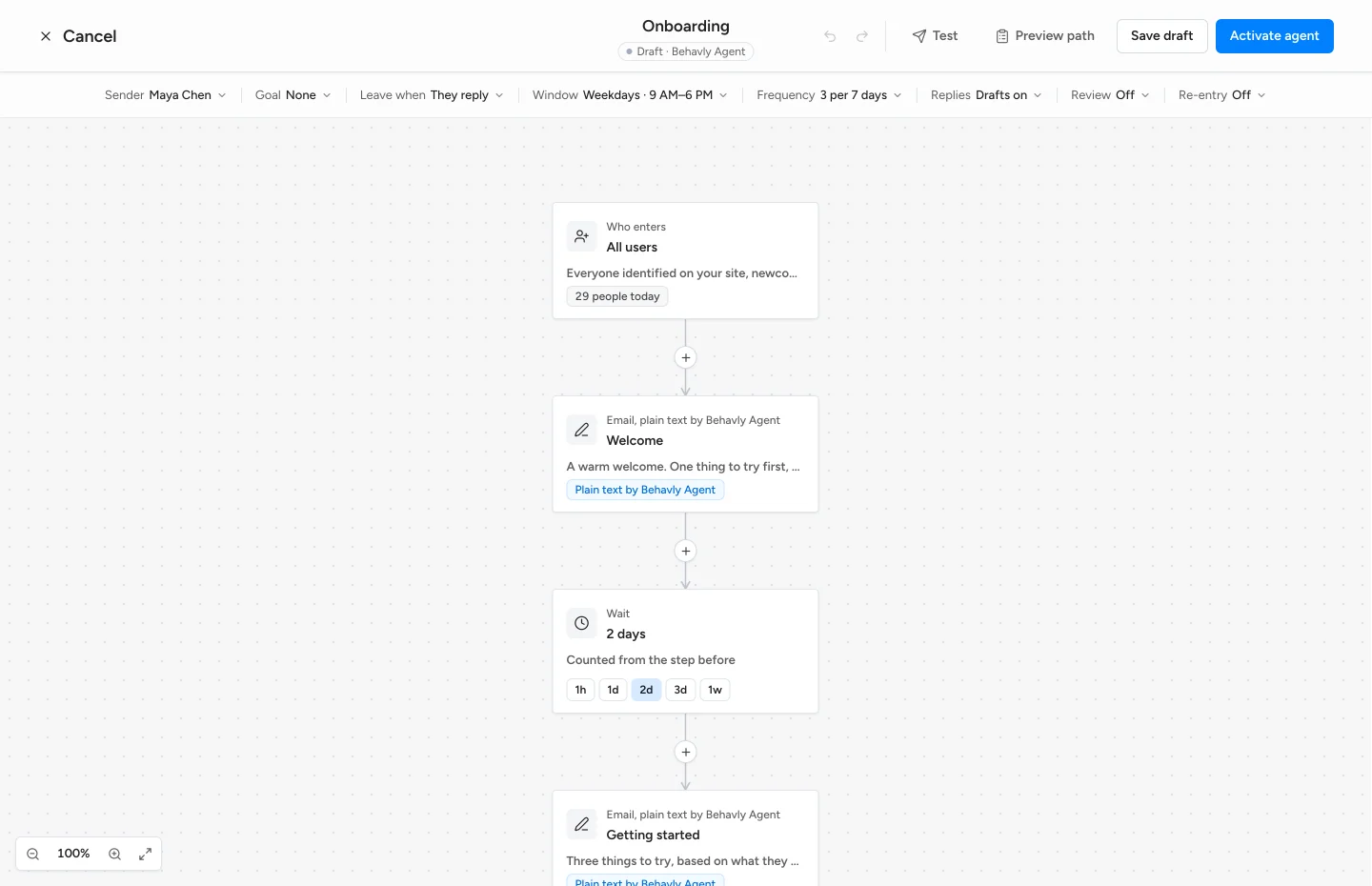
Behavly tracks what each signed-in user does in your product and runs paths like these: an AI follow-up agent for your own users.
- 1Track. Add the snippet from Tracking → Setup to your signed-in pages; it ties activity to the signed-in person with no identify call. Send actions like
proposal_sentwithbehavly.track. - 2Describe the path. In Automations, choose Pattern Campaign or Trigger Campaign. Under Describe the path, write it as the examples above are written and choose Build the path: Behavly lays out the emails, waits and branches for you to check. Nothing sends until you activate.
- 3Paths 1 to 4 start from a group. Describe it under Looking for another pattern? and see who matches, and how many, before Add this pattern. Always on re-checks the group every 10 minutes and takes each person in once, as they join; Once sends to the people in it when it starts.
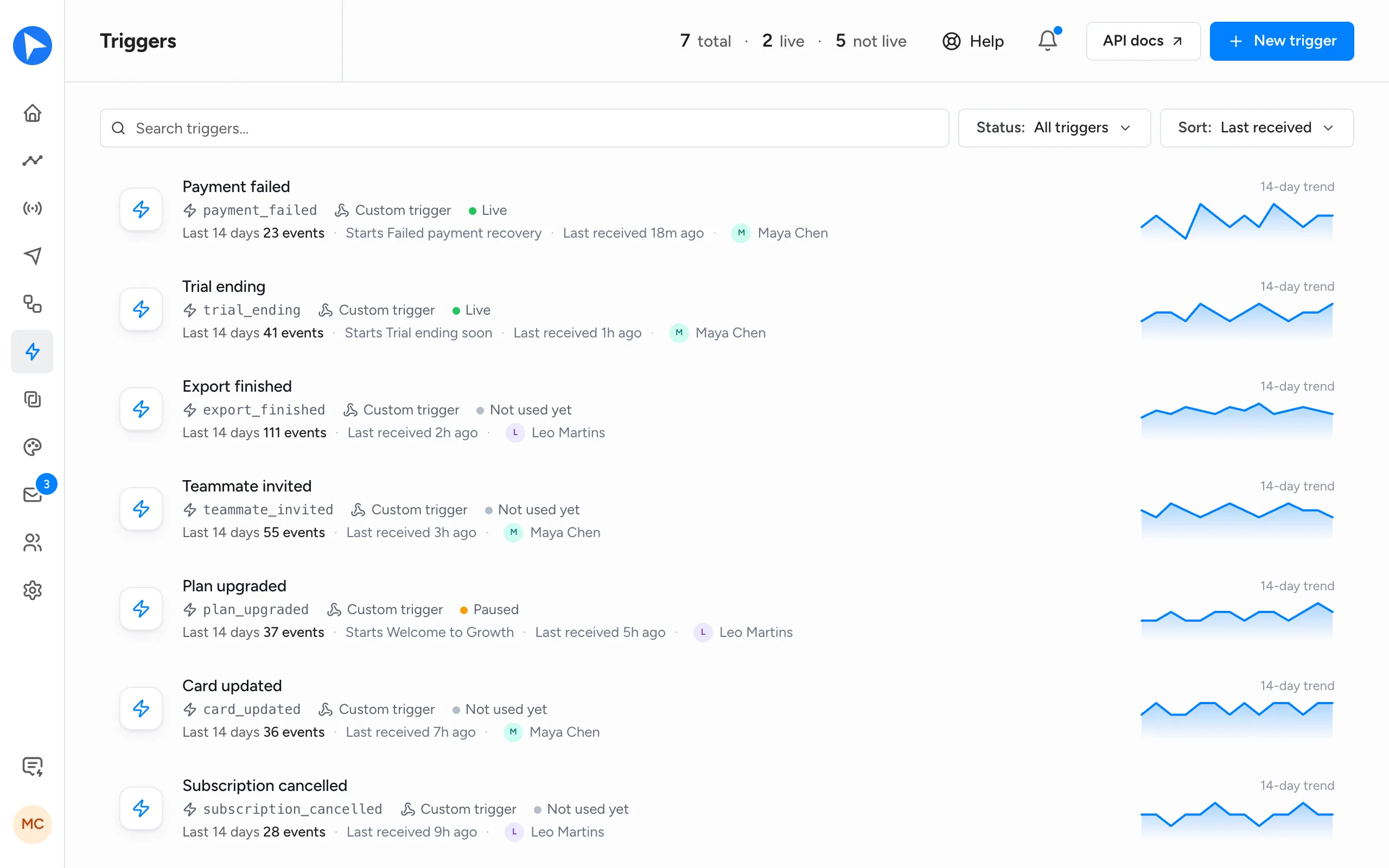
- 4Paths 5 and 6 start from an event. Make the trigger in Triggers and send it from your server with a Send events only key; a Trigger Campaign takes the person in as it arrives. Set If it happens again to A new case each time for payments, Once per person for trials.
- 5Let Behavly Agent write. A Plain text by Behavly Agent step is written for each person from their activity, in your sender’s voice, and reads the earlier emails on the path so the second picks up from the first. Instructions for Behavly Agent says what it is for. For exact facts, an Email step sends your template Send as designed, with
{{event.amount}}filled in from the event. - 6Set the goal and exits. Pick the Goal, and turn on They reach the goal under Leave when; They reply is on by default. Someone who stops matching the group isn’t taken off the path, so these are what stop it.
- 7Read before it sends. Preview writes any email step for a real person, and Test sends you the whole path. Review is off by default: turn on Hold Behavly-written emails for approval to release each written email yourself.
Emails go out from your own mailbox over IMAP/SMTP, or your account at an email service such as Resend or Amazon SES, connected in Settings → Email, on weekdays from 9:00 AM to 6:00 PM in each person’s timezone by default. Every campaign type runs on every plan, Free included; written emails count toward your plan’s monthly personalized emails.
Replies to emails sent through an email service aren’t read back into Behavly, so a replied branch or They reply exit can’t see them. Where replies should decide, send from an IMAP/SMTP mailbox.
Mistakes to avoid
- Following up on one signal. Wait for the second pricing visit, or the visit plus a plan limit.
- Waiting on the calendar. A fixed three-day wait reminds people who did the step yesterday. Wait until they act, with a limit.
- No goal or exit. The person who upgraded on Tuesday gets “ready to upgrade?” on Thursday.
- Treating opens as interest. Some mail apps load images on their own. Branch on clicks, logins, visits or actions.
- Stacking paths. One person can qualify for three in a week. Behavly’s Agent guardrails cap it at 3 emails in any 7 days, with campaigns 24 hours apart, by default.
How to measure automated follow-up emails
- One goal per path. Count who reaches it, such as
upgraded, not who opened. - Credit the last email before it, and keep counting a few days after the path ends. Behavly does both, counting for 7 days after a person’s last email.
- Read each step’s numbers. Clicks with no goal mean the email promises something the next screen doesn’t give.
- Compare with doing nothing: similar users from before the path started, or a few held out.
- Change one thing at a time. Behavly’s A/B test names a winner only once each version has 30 sends and the gap is unlikely to be chance, and Path review suggests changes each Monday once a campaign has sent 20 emails.
Questions
- What are automated follow-up emails based on user behavior?
- Emails your product sends to one of its own users because of something they did or didn’t do, such as stopping during setup. Each next email waits on what they do, and it all stops when they reply or reach the goal.
- How are behavior-based follow-ups different from a drip campaign?
- A drip sends the same emails on fixed days to everyone on a list. A behavior-based path waits on each person, branches on what they did, and ends the moment they do what it was for.
- Can AI write automated follow-up emails?
- Yes. In Behavly, a Behavly Agent step writes each follow-up for the person who reaches it, from what they did in your product, in your sender’s voice. Review is off by default; turn it on to approve each written email before it sends.
- Can I use Behavly for cold-email follow-ups?
- No. Behavly follows up with your own users: people who signed in on your site, filled in one of your forms, or were imported by you. It is not a cold-outreach tool; for prospect follow-up, see the AI follow-up email tools comparison.