Send an email when a signed-in user visits a page
A page-visit email goes to a signed-in user after they view a page you chose. Which pages deserve one, how to set it up, and waits that end when they act.
By Ardit Karavidaj, Founder & CEO, FoundryX · Updated October 31, 2026
A page-visit email is an email sent to a signed-in user because they viewed a page you chose, such as your pricing page or a setup guide in your docs, and written about what that visit says they need next. It is one of the simplest kinds of behavior-based email: the page starts it, a wait gives the person time to act on their own, and the email answers the question that brought them there.
Who can get a page-visit email?
Only people you can identify. A signed-in user is someone who signed up for your product, so their visit is tied to an address and to a reason to hear from you. An anonymous visitor is a browser with no name or address attached, and has not asked to hear from you.
In Behavly, a page-visit email goes to identified people only. Anonymous visitors are recorded for heatmaps and traffic, never emailed, and Behavly does not buy contact data to put names to them. A visitor becomes someone you can write to once they sign in on your site.
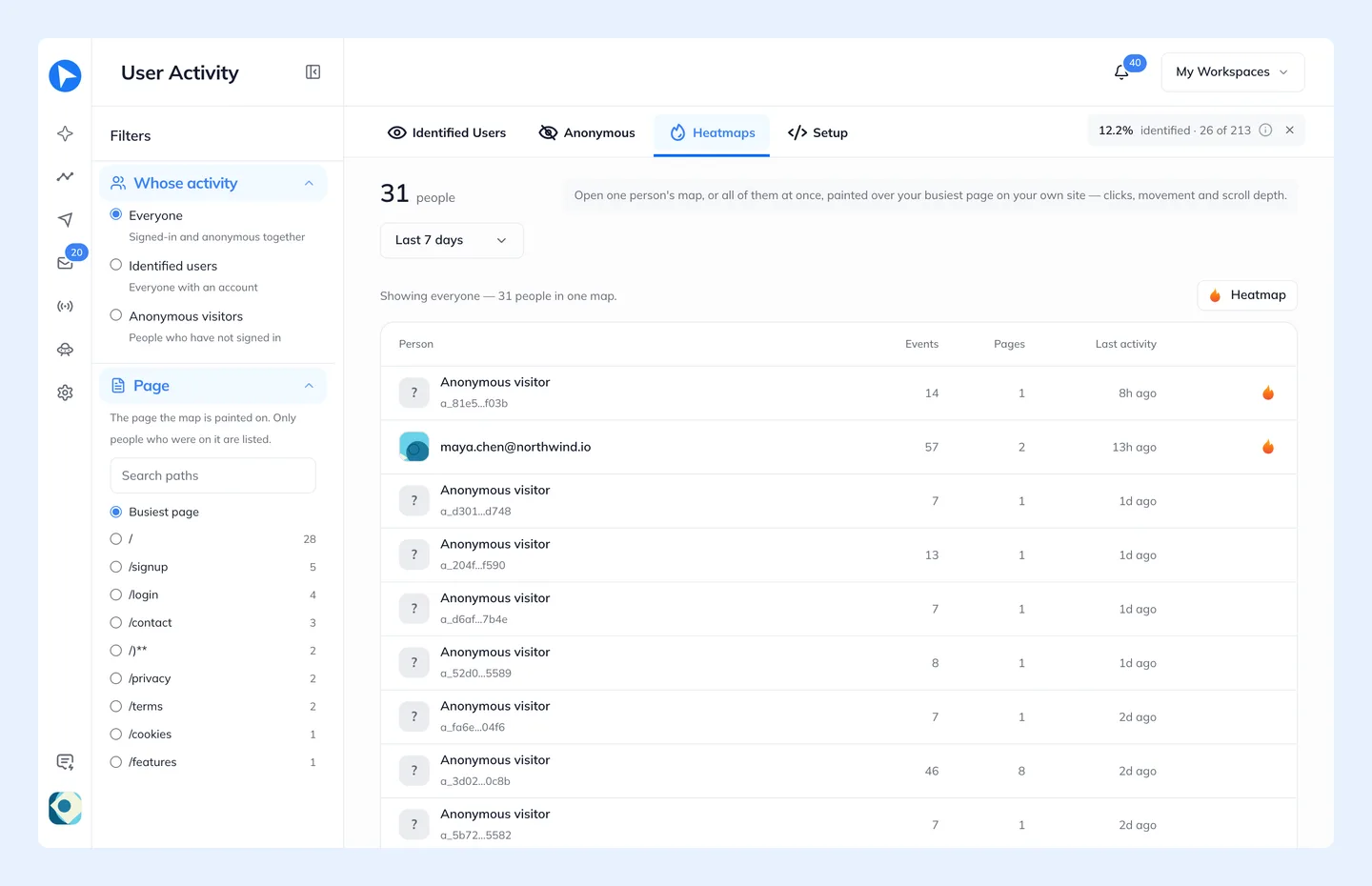
That makes installation matter. Put the tracking snippet on every page you want to start an email from, docs included, then check in Tracking → Heatmaps that the people on that page show up under Identified users. The snippet recognizes the signed-in session on its own, with no extra code to identify anyone.
Which page visits are worth an email?
| Page visited | What it usually means | Worth an email? |
|---|---|---|
Pricing, twice or more in a week | Deciding, or checking a limit they’re close to | Yes: the one plan that fits their usage |
Pricing, once, on the first day | Checking what they’re getting into | No. Let onboarding do the work |
A plan or billing page right after a limit | Blocked and looking for the way through | Yes, the same day |
Docs for a feature they haven’t set up | Trying it, or judging the effort | Yes: the shortest working example |
An integration’s setup page, nothing connected | Started and stopped | Yes: the step after the one they reached |
The cancel or downgrade page | Weighing whether to stay | Carefully: see churn prevention emails |
Your homepage or blog | Almost anything | No |
One view is weak on its own. The visits worth answering come with context: a repeat, a limit just hit, a step left undone. For twenty triggers like these, page visits among them, see behavioral email examples.
How do you send an email when a user visits a page?
It takes four parts: a visit tied to a person, a rule that matches the page, a wait, and a check before sending that the email is still needed. Behavly has two ways to start; the rest of the path is the same.
- Start from a pattern
- In Automations, create a Pattern Campaign for the people who visited the page. Behavly may already offer one, such as Visited /pricing; otherwise describe it, like “people who visited /docs/webhooks”, and see who matches before it’s saved. Set How it runs to Always on: Behavly re-checks the group every 10 minutes and each person enters once, the moment they qualify. Keep Also the people in it now off, so people who viewed the page before you started don’t all enter at once. Nothing to add beyond the snippet.
- Start from a trigger
- Make a trigger in Triggers, such as
webhook_docs_viewed, and callbehavly.track("webhook_docs_viewed")on that page. A Trigger Campaign takes the identified visitor in the moment it fires. Set If it happens again to Again after a break so a returning reader can go through again 7, 30 or 90 days after leaving. Events from the snippet don’t count toward your plan’s product events.
The trigger route is the same mechanism as other event-triggered emails, with the page as the event. Wherever a path asks for a page, in a wait, a branch or the goal, choose how it matches: Is exactly for one page, Starts with for a page and everything under it, like /docs/, or Contains for any address with that text, like a translated /de/pricing.
Waits that end when they act
The wait does most of the work. An email within minutes reads as being watched; after a day, many people have done the thing on their own. A Behavly wait ends when the time runs out, or the moment they act.
- Wait until they do something. Visit a page, log in or do an action in your product, with But no longer than as the limit. They move on as soon as they act.
- Skip if they already did it. Anyone who already did the action the email is about never gets it.
- A goal that ends the path. Set the action you want, like
upgraded, as the Goal and turn on They reach the goal under Leave when. - The sending window. Monday to Friday, 9:00 AM to 6:00 PM in each person’s timezone by default, so a late-night visit gets its email in working hours.
Here are paths that wait for a page visit, one for pricing and one for docs:
| Step | Pricing page path | Docs page path |
|---|---|---|
Who enters | Pattern: visited /pricing, Always on | Trigger: webhook_docs_viewed from the docs page |
Wait | 1 day | Until they do something: webhook_created, but no longer than 2 days |
Email | The one plan that fits their usage and what carries over. Skip if they already did it: upgraded | A working example for their account. Skip if they already did it: webhook_created |
Then | Branch on clicked a link in it within 3 days: a click gets one short follow-up in the same thread, skipped if they upgraded; no click ends the path | A reply ends the path and lands in your Inbox |
Goal | upgraded, with They reach the goal under Leave when | webhook_created |
Page-visit email examples
Two emails from Quayline, a made-up uptime-monitoring tool. Each is written from what the person did around the visit, never about the visit itself.
Subject: Quayline for all your services
Hi Sara,
You’re watching 5 services on Quayline, everything the free plan covers. Team monitors up to 50, checks every 30 seconds instead of every 5 minutes, and keeps the uptime history you’ve built since March.
You can add the new monitors straight after upgrading.
See Team for your workspace: [link]
Ravi
Written from her usage: 5 monitors, history since March. Her pricing visits are what started it, and the email never mentions them.
Subject: Your first Quayline webhook, ready to paste
Hi Tom,
Here’s a webhook for the api-prod monitor you set up last week. Paste in your endpoint and Quayline posts to it the moment that check goes down, and again when it’s back up.
The test button on the same screen sends a sample alert, so you can see the payload first.
Add the webhook: [link]
Ravi
Started by a behavly.track call on the docs page, and skipped for anyone who creates a webhook during the wait.
Pricing visits have their own guide, covering checkout, plan limits and what an upgrade email should say: pricing page follow-up.
More pages worth a follow-up, and what to write
Pricing and docs are the usual starting points. These pages work the same way, as long as the email is about the person’s account and not about the visit.
- An integration’s page, with nothing connected
- They’re checking whether it fits. Write about the step after the one they reached: which account to connect, what syncs first and how long it takes. If the setup needs an admin, write something they can forward.
- Your security, SSO or compliance page
- Someone is often answering questions for their company. Send short, plain facts they can paste into a questionnaire, a link to the full document, and a person to reply to. Skip the pitch: the reader may not be the buyer.
- A template or example gallery
- They want a shortcut. Point to the one template closest to what they already built, ready to copy into their account.
- Team settings, with nobody invited
- They’re thinking about bringing others in. Say what teammates see when they join, what stays private, and link to the invite screen.
- The same help article, twice
- They’re stuck on the step it covers. Send the fix for the snag most people hit there, or offer to do it with them. Two visits to one article say more than one visit to five.
How to tell if a page-visit email works
- One goal per page. For a pricing path it’s the upgrade; for a docs path, the thing the docs explain, like a first webhook created. Count who reaches it after the email.
- Compare with people who visited and got nothing. Some people act on their own after reading a page. Keep a small group out of the path, or look at visitors from the weeks before you started, to see what the email added.
- Watch how many emails are skipped. If most people do the action during the wait, the wait is doing the work, and that page may not need an email at all.
- Read the replies. A question the page should have answered tells you what to change on the page, which helps everyone who reads it, not only the people you email.
- Treat opens as a hint. Litmus’s September 2026 email client report, built from over 1.5 billion opens, estimates that Apple’s Mail Privacy Protection affects roughly 55–60% of all email opens, so an open is weak evidence that anyone read the email.
Four questions before you add a page
Before you turn a page into a trigger, check it against these. If any answer is no, the visit is better left alone.
- Does the visit say what they need next, not just that they were curious?
- Is there something in their account to write about: a number, a project, a step half done?
- Can you name the action that ends the path, so the email stops once it has done its job?
- Would a colleague who noticed the same thing send a note, or would it feel odd to get one?
Mistakes to avoid
- Sending within minutes. Speed reads as surveillance here.
- Narrating the visit. “I saw you on our pricing page” feels like being watched. Write about their work and the next step.
- Answering every view. One glance isn’t intent. Wait for a repeat, a limit or an unfinished step.
- No exit when they act. If they upgrade or finish setup in the meantime, the email is wrong.
- Trying to name strangers. Buying data to identify anonymous visitors erodes trust and is a legal risk in many places.
Questions
- Who can receive a page-visit email?
- Only identified people: users who were signed in on your site when they viewed the page. Anonymous visitors have no address and haven’t asked to hear from you, so Behavly records them for heatmaps and traffic but never emails them.
- How long should you wait after a page visit before emailing?
- Long enough for the person to act on their own, often until the next working day. End the wait early when they do the thing, and skip the email for anyone who already has.
- Do I need code to send an email when a user visits a page?
- Not for the pattern route: the tracking snippet on your signed-in pages is enough. The trigger route adds one
behavly.trackcall on the page you want to start from. - Can one page-visit email cover several pages?
- Yes. On the trigger route, put the same
behavly.trackcall on each page. Inside a path, match a page with Starts with to cover everything under it, like /docs/, or with Contains for any address with that text, like a translated /de/pricing.