Follow-up email examples for SaaS: 10 templates based on what each user did
Ten follow-up email examples for SaaS users who signed up, stalled, visited pricing or went quiet, with subject lines and when to send each one.
Updated
A follow-up email is a short message sent because of something a person did or didn’t do, picking up from that moment instead of starting over. For a SaaS product, that moment is usually inside the product: someone signed up and never came back, stopped halfway through setup, opened your pricing page twice, or quietly stopped logging in. A good follow-up names what happened, asks for one next step and links straight to it. A bad one says “just checking in” and could have been sent to anyone.
This page is about following up with your own users. Sales follow-ups after a meeting or a cold email are a different job with different rules. Every example below is an email based on what the user did, and the same moments can run on their own as automated follow-up emails.
What makes a good follow-up email?
- It starts from what they did. “Your draft invoice for Halden Studio is saved” tells them you know where they are. “Just checking in” tells them nothing.
- One ask, one link. The link opens the exact screen where the next step happens, not the dashboard.
- Short enough to read on a phone. Three or four short paragraphs at most. If it needs a heading, it’s a newsletter.
- From a person they can answer. A name, a normal sign-off and a reply address someone reads. “It keeps failing at step two” is the most useful reply you can get.
- No invented deadline. Say what the next step unlocks for them, not what they’ll lose.
- It stops when they act. A follow-up about a step they already finished is the fastest way to teach someone to ignore you.
When to send a follow-up email
The right wait depends on what happened, not on a fixed day. Give people a fair chance to do the step on their own first; many come back by themselves the same day.
| What happened | Follow up after | Stop when |
|---|---|---|
Signed up, never came back | The next day | They log in |
Started something and stopped partway | About a day | They finish that step |
Opened the same setup screen several times | The next working day, offering help | They finish or reply |
Visited pricing, didn’t upgrade | One or two days | They upgrade or reply |
Trial ending, product in real use | A few days before the end | They pay |
Trial ending, product barely used | Well before the end | They reach the first real result |
Tried a feature once, never again | A few days | They use it again |
Usage dropped well below their normal | Two or three of their usual gaps | They’re back |
A payment failed | The same day | The card is updated |
Follow-up email examples
These are for Pennant, a made-up invoicing app for freelancers. Its first real result is the first invoice a client pays through Pennant. Each example is for one moment, and each names what that person actually did.
Subject: Your Pennant account is ready for your first invoice
Hi Lena,
You signed up on Tuesday but haven’t sent anything yet. The quickest way to see Pennant working is one real invoice: pick a client, add a line, and send it. Most people do it in about three minutes.
Create your first invoice: [link]
If you’re moving from another tool, reply and I’ll tell you what carries over.
Sofia
Subject: Your draft invoice for Halden Studio is saved
Hi Marco,
Your draft for Halden Studio is saved, with both line items and your bank details. The only step left is sending it, and you can preview exactly what Halden will see first.
Open your draft: [link]
Sofia
Subject: Connecting Stripe to Pennant
Hi Ade,
You started connecting Stripe twice yesterday. The step that usually stops people is Stripe asking for a business type: if you invoice in your own name, choose “Individual”.
Once it’s connected, clients can pay by card from the invoice itself.
Finish connecting Stripe: [link]
If it still won’t connect, reply and we’ll do it together.
Sofia
Subject: What Pro changes for how you invoice
Hi Jonas,
You’ve sent nine invoices this month, all to the same three clients. Pro adds the one thing that saves time at that point: recurring invoices that send themselves on the date you pick.
You can see your plan and what Pro adds here: [link]
If the price is the question, reply and tell me what you’d use it for.
Sofia
Subject: Your trial ends Friday; your six invoices stay
Hi Nadia,
Your trial ends on Friday. You’ve sent six invoices and two are already paid, so here’s what happens next: choose a plan and everything carries on as it is, including the reminders on the four still open.
Choose your plan: [link]
Sofia
Subject: One invoice, start to finish, before your trial ends
Hi Tom,
You set up your profile last week but haven’t sent an invoice yet. Before deciding anything, try one real invoice with a client you’re billing anyway. It’s the only way to see whether Pennant saves you time.
Send one invoice: [link]
If something got in the way, reply and tell me what.
Sofia
Subject: Your monthly invoice to Ardent Labs
Hi Priya,
You set up one recurring invoice, for Ardent Labs, and it goes out on the 1st. You also bill Kite & Co every month by hand, so the same setup would save you that step too.
Make Kite & Co recurring: [link]
Sofia
Subject: Your March invoices are still in drafts
Hi Sam,
You usually send invoices every Friday, and three drafts from March are still waiting, for Halden, Brookline and Ortega. Nothing is lost; they’re exactly as you left them.
Open your drafts: [link]
If you’ve moved to something else, I’d honestly like to know why.
Sofia
Subject: Your Pennant payment didn’t go through
Hi Owen,
This month’s payment for your Pro plan was declined by your bank. Nothing has changed on your account yet, and your recurring invoices are still scheduled.
Updating the card takes a minute: [link]
Sofia
Subject: Re: Your draft invoice for Halden Studio is saved
Hi Marco,
In case the first note got buried: the Halden Studio draft is still ready to send. If something about it isn’t right, like the payment terms or the currency, reply and I’ll help you change it.
Sofia
Each email names one thing the person did and asks for one step. The second follow-up is shorter than the first and arrives under it.
Follow-up email subject lines
A good subject names the thing they made or the step they’re on. It reads as information, so the people who meant to come back anyway open it.
| The moment | A subject that works | A subject to avoid |
|---|---|---|
Draft left unsent | Your draft invoice for Halden Studio is saved | Following up |
Setup step tried twice | Connecting Stripe to Pennant | Need help? |
Pricing visited twice | What Pro changes for how you invoice | Don’t miss out! |
Trial ending, in use | Your trial ends Friday; your six invoices stay | Last chance |
Quiet for weeks | Your March invoices are still in drafts | We miss you |
How many follow-up emails should you send?
Two for each moment, three at most, a few days apart, with the later ones shorter. Stop the moment the person does what the emails were for, or replies. After that, write again only when something changes for them. Across all your follow-ups, cap how many emails one person can get in a week, so someone who stalls in two places doesn’t hear from you twice in one afternoon.
Follow-up email mistakes to avoid
- “Just checking in.” If the email doesn’t say what happened, the reader has to work out why you wrote. Most won’t.
- Listing everything they haven’t done. Six open items is a project. One named step is a task.
- Following up on something already done. If a step finishes on your server, the browser never sees it. Send that event from your backend, or the reminder goes to people who already did it.
- The same email to everyone. Someone who sent six invoices and someone who sent none are not in the same place, even on the same day of the trial.
- A no-reply address. The answer to “what got in the way?” is the most useful thing a follow-up can bring back. Make sure it reaches a person.
How to send follow-up emails in Behavly
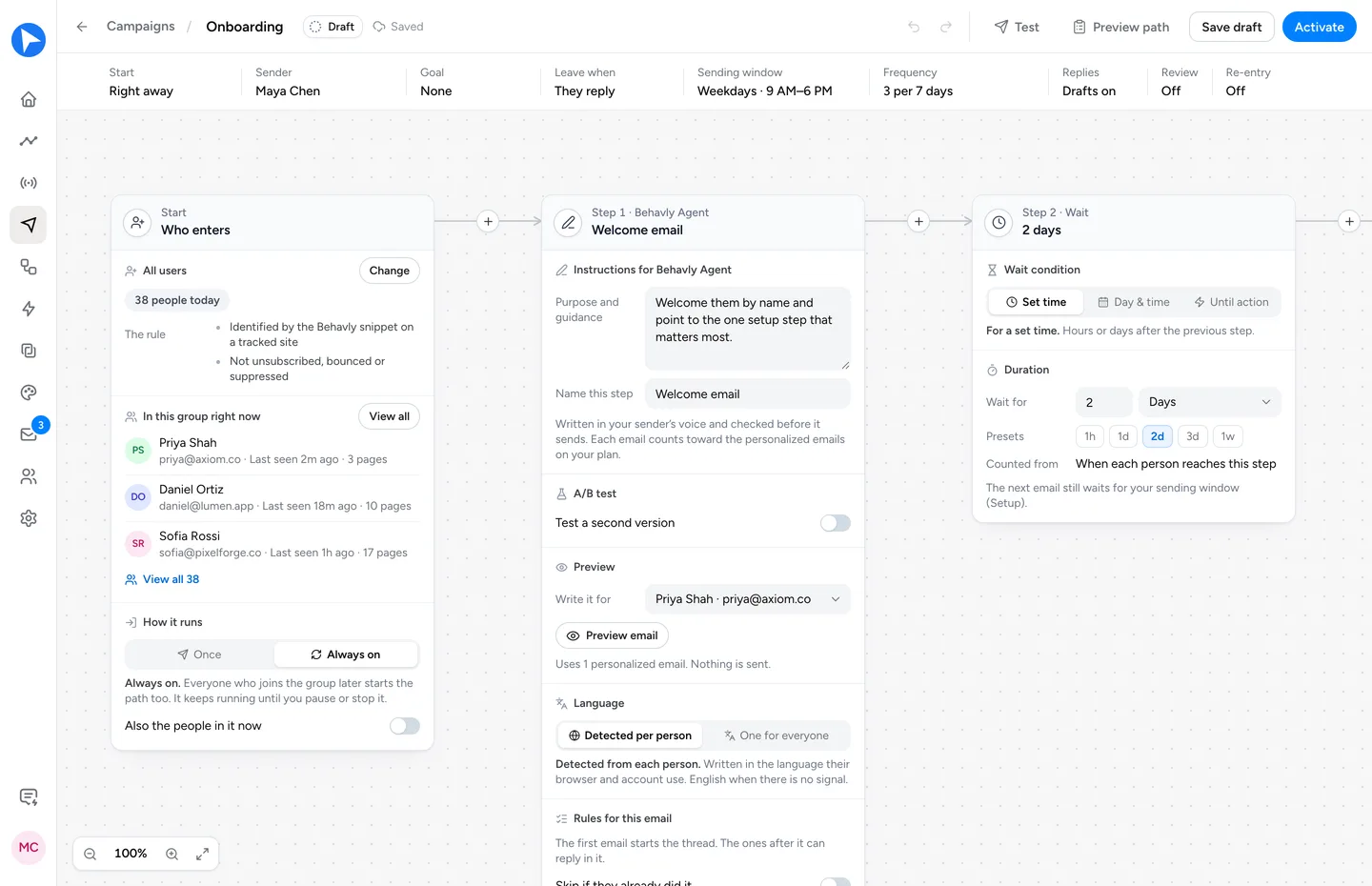
Behavly tracks what each signed-in user does in your product and sends follow-ups like these from your own mailbox, each one written from that person’s activity.
- 1Track. Add the snippet from Tracking → Setup to your signed-in pages; it ties activity to the signed-in person with no identify call. Send actions like
invoice_sentwithbehavly.track. - 2Choose who enters. In Automations, choose Pattern Campaign for a group, such as people who did
invoice_createdbut neverinvoice_sent, or Trigger Campaign for an event your server sends, such as a failed payment. - 3Describe the path. Under Describe the path, write who it is for and what each email should do, and choose Build the path. Behavly lays out the emails, waits and branches for you to check. Nothing sends until you activate.
- 4Let Behavly Agent write. A Plain text by Behavly Agent step is written for each person from their activity, in your sender’s voice. Instructions for Behavly Agent says what it is for, such as “Name the draft they left and link to it. One step only.”
- 5Wait, then follow up once more. Add a Wait, then a shorter second email. Reply in the same thread is on by default, so it arrives under the first one.
- 6Stop when they act. Set the Goal, such as
invoice_sent, and turn on They reach the goal under Leave when. They reply is on by default. - 7Read before it sends. Preview writes any email step for a real person, and Test sends you the whole path. Review is off by default: turn on Hold Behavly-written emails for approval to release each written email yourself.
Emails go out from your own mailbox, connected in Settings → Email, on weekdays from 9:00 AM to 6:00 PM in each person’s timezone by default. By default, different campaigns stay 24 hours apart and nobody gets more than 3 emails in any 7 days. Every campaign type runs on every plan, Free included.
Questions
- How do you write a follow-up email?
- Start from what the person did, ask for one next step, and link straight to it. Keep it to a few short paragraphs, sign it with a name, and send it from an address someone reads.
- How long should you wait before sending a follow-up email?
- It depends on what happened. About a day after someone stops partway through something, one or two days after a pricing visit, and the same day for a failed payment. Never within minutes: many people come back on their own.
- How many follow-up emails is too many?
- More than two or three about the same moment. Space them a few days apart, make each one shorter, and stop as soon as the person acts or replies.
- What is a good subject line for a follow-up email?
- One that names the thing they made or the step they’re on, like “Your draft invoice for Halden Studio is saved”. Subjects like “Following up” or “Just checking in” could go to anyone, and people learn to skip them.